Home

Writing & Content

AI Tools27Text Tools25PDF Tools24

Developer & Build

Developer Tools24File Converters9Color & Design15SEO & Web13

Media

Image Tools23Fun & Games18

Everyday

Calculators27Health & Fitness11Utility Tools12Time & Productivity9Lifestyle9
Browse all 246 tools
Guides

ToolWise

Free Online Tools

246+ free online tools for students, developers, designers, and professionals. No signup required. 100% free forever, and most tools run entirely in your browser for total privacy.

Browse by Category

  • AI Tools
  • Text Tools
  • PDF Tools
  • Image Tools
  • File Converters
  • Developer Tools
  • SEO & Web
  • Calculators
  • Color & Design
  • Time & Productivity
  • Lifestyle
  • Health & Fitness
  • Fun & Games
  • Utility Tools
  • All 246Tools →

AI & Text Tools

  • AI Summarizer
  • Grammar Checker
  • Paraphraser
  • Word Counter
  • Case Converter
  • AI Email Writer

Image & PDF Tools

  • Background Remover
  • Image Compressor
  • Image to Text (OCR)
  • PDF to Text
  • Text to PDF
  • YouTube Thumbnail

Calculators & Dev

  • Compound Interest
  • BMI Calculator
  • SIP Calculator
  • Loan EMI Calculator
  • JSON Formatter
  • Regex Tester

Popular Guides

  • 10 Developer Tools
  • SEO Meta Tags Guide
  • Image Compression Guide
  • Secure Passwords Guide
  • Compound Interest Guide
  • JSON Debugging Guide

Company

  • All Tools
  • All Guides
  • About ToolWise
  • Our Founder
  • Editorial Policy
  • Contact

© 2026 ToolWise — 246+ Free Online Tools. All rights reserved.

Privacy PolicyTerms of ServiceEditorial PolicyContact

ToolWise offers 246+ free online tools — including an AI summarizer, grammar checker, paraphraser, JSON formatter, word counter, image compressor, background remover, PDF converter, QR code generator, BMI calculator, and many more browser-based utilities for students, writers, and developers. No signup, no upload, no limits.

Advertisement
HomeToolsFun & GamesMinesweeper
Fun & GamesGame

Minesweeper

The classic mine-clearing puzzle. Reveal every safe cell without detonating a mine. Numbers tell you how many mines touch each cell — use logic to flag dangers and clear the rest.

TA
Tanbir Ahamed·Founder of ToolWise · Software Engineer
Published July 2026Updated August 2026

Interactive Tool Workspace

0:00 10 —
Click any cell to start — the first click is always safe

Tap to reveal · right-click to flag · numbers count neighbouring mines

How to Use

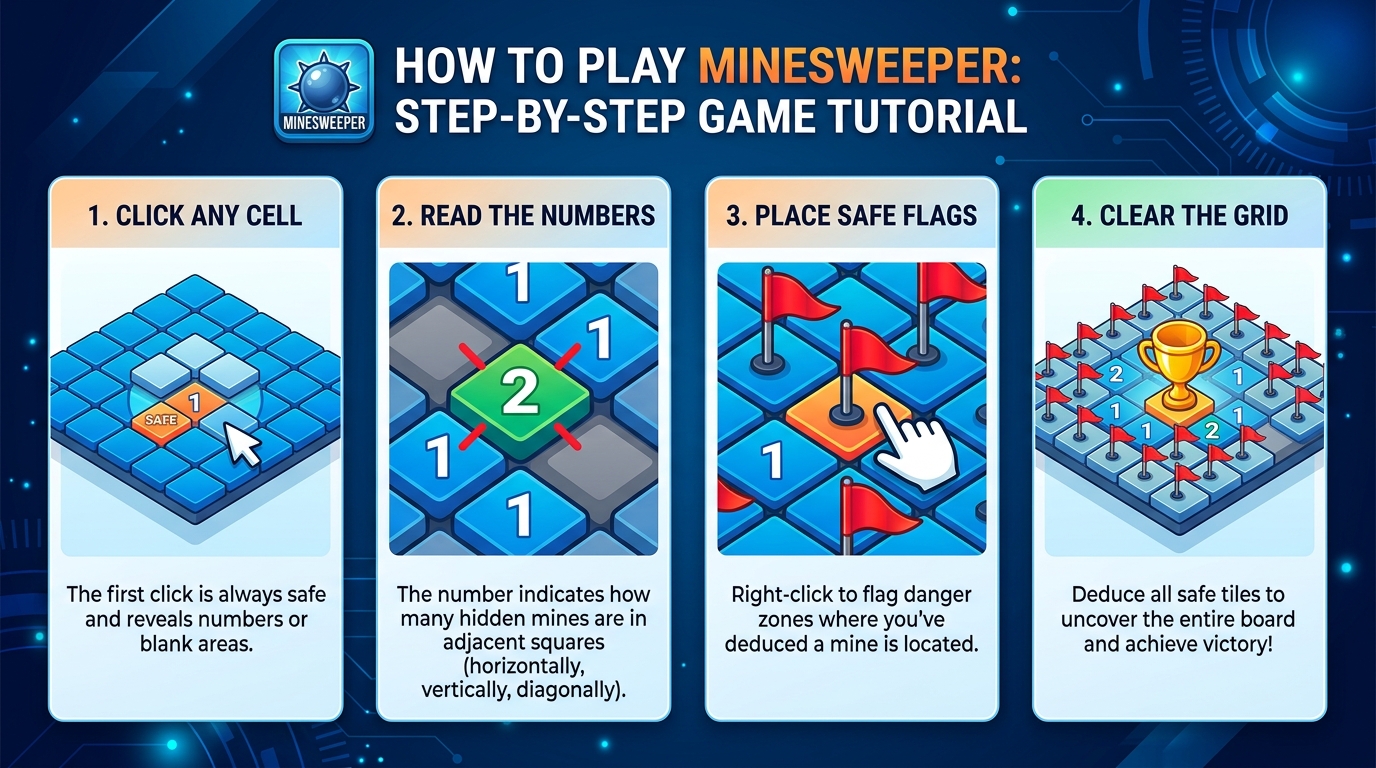
  1. 1Pick a difficulty — Beginner (9×9, 10 mines), Intermediate (16×16, 40), or Expert (30×16, 99).
  2. 2Left-click (or tap with Flag mode off) to reveal a cell. The first click is always safe.
  3. 3Read the numbers: each counts the mines touching that cell across its eight neighbours.
  4. 4Right-click on desktop — or toggle Flag mode and tap — to mark a cell you believe is a mine.
  5. 5Clear every non-mine cell to win. The timer pauses the moment the board is solved.

Features

  • ✓Three classic difficulty levels (Beginner, Intermediate, Expert)
  • ✓First-click is always safe — opening reveal clears a real area
  • ✓Flood-fill reveal of zero regions, just like the original
  • ✓Chord (click a satisfied number) to clear neighbours in one move
  • ✓Flag mode for touch devices, right-click for desktop
  • ✓Live timer and per-difficulty best time kept in this browser
Comprehensive Guide & Reference

The Complete Guide to Minesweeper and Reading the Numbers

Learn the rules behind the classic minesweeper puzzle, how each numbered cell encodes its neighbors, and the trick to never guessing when the board allows it.

1. How Minesweeper Is Played

Minesweeper drops you onto a grid that starts entirely covered. Each cell either hides a mine or shows a number: the number on a revealed cell counts how many of its eight neighbors (including diagonals) hide a mine. Left-click reveals a cell; right-click flags a cell as a suspected mine. If you reveal a mine, you lose. Win by revealing every non-mine cell. The first click is always safe: most implementations, including ours, move any mine under your first click to keep the puzzle possible.

When you reveal a cell whose number is zero, the game automatically cascades outward because all of its neighbors must also be safe. The first move is therefore a discovery move: click near the center and watch a region open up. The puzzle then becomes a slow inference puzzle: which cells around a partially revealed area must contain mines, and which we can rule out?

2. The Number-Subtraction Rule That Unlocks the Game

The single most useful reasoning tool in Minesweeper is the subtraction rule. Pick a revealed numbered cell. Count how many flags already touch it. The number on the cell minus the count of flags touching it equals how many unflagged mines remain among its other unrevealed neighbors.

If that difference is zero, all of the unrevealed neighbors of that cell are safe: every flag worth of mine is already accounted for, so you can safely click any covered neighbor of the cell. If that difference equals the number of covered neighbors, then every covered neighbor is a mine, and you can flag them all without further thinking. Most wins in Minesweeper are sequences of these two deductions cascading out from the boundary between cleared and uncleared regions.

3. The 1-2-1 Pattern and Why Patterns Beat Computation

Most Minesweeper players eventually hit a wall where raw counting does not give them safe squares, but patterns do. The most famous is the 1-2-1 pattern: three numbered cells reading 1, 2, 1 along the edge of a partially cleared region, with three unrevealed cells adjacent to them. The pattern implies the two outer unrevealed cells are mines and the middle one is safe. Internalize a handful of these patterns (1-2-1, 1-2-2-1, the corner-touch 1, the corner-touch 2) and the speed and confidence of your play doubles overnight.

4. Difficulty Levels and When to Push Up

ToolWise Minesweeper offers three classic difficulty bands. Beginner is a 9x9 grid with 10 mines, plenty of space and a low chance of forced guess. Intermediate is 16x16 with 40 mines, the standard desktop Minesweeper level and where you learn to read 1-2-1 patterns. Expert is 30x16 with 99 mines, where the entire puzzle is inference at the boundary and a wrong click costs you a 99-cell board. Move up only when you finish the previous level without hovering over the board too often, and when you have stopped flagging cells you cannot justify from the subtraction rule.

Conclusion

Minesweeper is the most underrated logic puzzle on the planet. Every revealed number encodes a tiny amount of mine information, and chaining the subtraction rule across a boundary turns the puzzle into a deterministic walk rather than a guessing game. ToolWise Free Online Minesweeper gives you all three classic difficulty levels, smooth left-and-right click controls, and a first-click-safe board so you never start on a mine. Pick a difficulty, count flags carefully, and let the patterns do the work.

Frequently Asked Questions

How do I flag a mine on mobile?
Toggle the Flag button above the board, then tap any cell to plant (or remove) a flag. On desktop, right-click a cell to flag it. Flagged cells are safe from accidental reveals.
What do the numbers mean?
Each number tells you how many mines touch that cell (out of its eight neighbours). Use the counts to deduce which surrounding cells are safe to reveal and which to flag.
Is the first click always safe?
Yes. The board is generated after your first click and that cell plus its neighbours are guaranteed mine-free, so your opening reveal always clears a comfortable area — just like the classic.
What is"chording" and how do I use it?
If a revealed number already has that many flags around it, clicking the number reveals all remaining unflagged neighbours at once — a fast way to clear safe cells. Use the Flag action on a revealed number to chord.
How is my best time saved?
Your fastest win for each difficulty is stored in this browser's localStorage under a per-level key and restored next visit. Clearing your browser storage resets it. Beginner, Intermediate, and Expert each keep their own record.

Related Tools

Spin Wheel
Random Number Generator
Coin Flip
Dice Roller
Typing Speed Test
Reaction Time Test

Related Guides

10 Fun Online Games to Play During Breaks
10 Free Tools Every Developer Needs in 2026
JSON Formatter Guide: Pretty-Print, Minify & Validate
Advertisement