Home

Writing & Content

AI Tools27Text Tools25PDF Tools24

Developer & Build

Developer Tools24File Converters9Color & Design15SEO & Web13

Media

Image Tools23Fun & Games18

Everyday

Calculators27Health & Fitness11Utility Tools12Time & Productivity9Lifestyle9
Browse all 246 tools
Guides

ToolWise

Free Online Tools

246+ free online tools for students, developers, designers, and professionals. No signup required. 100% free forever, and most tools run entirely in your browser for total privacy.

Browse by Category

  • AI Tools
  • Text Tools
  • PDF Tools
  • Image Tools
  • File Converters
  • Developer Tools
  • SEO & Web
  • Calculators
  • Color & Design
  • Time & Productivity
  • Lifestyle
  • Health & Fitness
  • Fun & Games
  • Utility Tools
  • All 246Tools →

AI & Text Tools

  • AI Summarizer
  • Grammar Checker
  • Paraphraser
  • Word Counter
  • Case Converter
  • AI Email Writer

Image & PDF Tools

  • Background Remover
  • Image Compressor
  • Image to Text (OCR)
  • PDF to Text
  • Text to PDF
  • YouTube Thumbnail

Calculators & Dev

  • Compound Interest
  • BMI Calculator
  • SIP Calculator
  • Loan EMI Calculator
  • JSON Formatter
  • Regex Tester

Popular Guides

  • 10 Developer Tools
  • SEO Meta Tags Guide
  • Image Compression Guide
  • Secure Passwords Guide
  • Compound Interest Guide
  • JSON Debugging Guide

Company

  • All Tools
  • All Guides
  • About ToolWise
  • Our Founder
  • Editorial Policy
  • Contact

© 2026 ToolWise — 246+ Free Online Tools. All rights reserved.

Privacy PolicyTerms of ServiceEditorial PolicyContact

ToolWise offers 246+ free online tools — including an AI summarizer, grammar checker, paraphraser, JSON formatter, word counter, image compressor, background remover, PDF converter, QR code generator, BMI calculator, and many more browser-based utilities for students, writers, and developers. No signup, no upload, no limits.

Advertisement
HomeToolsFun & Games2048
Fun & GamesGame

2048

Slide and merge tiles to reach 2048 — arrow keys, WASD, or swipe. Persistent best score, up to 10 undos, and 4×4 / 5×5 / 6×6 grids. 100% offline, instant play.

TA
Tanbir Ahamed·Founder of ToolWise · Software Engineer
Published July 2026Updated August 2026

Interactive Tool Workspace

Score 0 0

Arrows / WASD / swipe to move · same tiles merge — keep going past 2048 for a higher score

How to Use

  1. 1Use arrow keys, WASD, or swipe to slide the entire grid.
  2. 2Identical tiles that collide merge into one worth their sum.
  3. 3Each move spawns a new 2 or 4 in a random empty cell.
  4. 4Reach the 2048 tile to win — keep going for higher scores.
  5. 5Use Undo to walk back mistakes; the grid size chip reshuffles.

Features

  • ✓Classic 2048 with keyboard, WASD, and touch-swipe controls
  • ✓4×4, 5×5, and 6×6 grid sizes for varied difficulty
  • ✓Up to 10 undos to recover from misplays
  • ✓Persistent best score via localStorage
  • ✓Game-over and win banner with one-click replay
  • ✓100% client-side — works offline once the page is loaded
Comprehensive Guide & Reference

The Complete Guide to Playing and Mastering 2048

Learn the rules behind the sliding-number puzzle, the strategy that consistently produces high tiles, and how to use the undo button to recover from mis-swipes.
1. How 2048 Actually Works

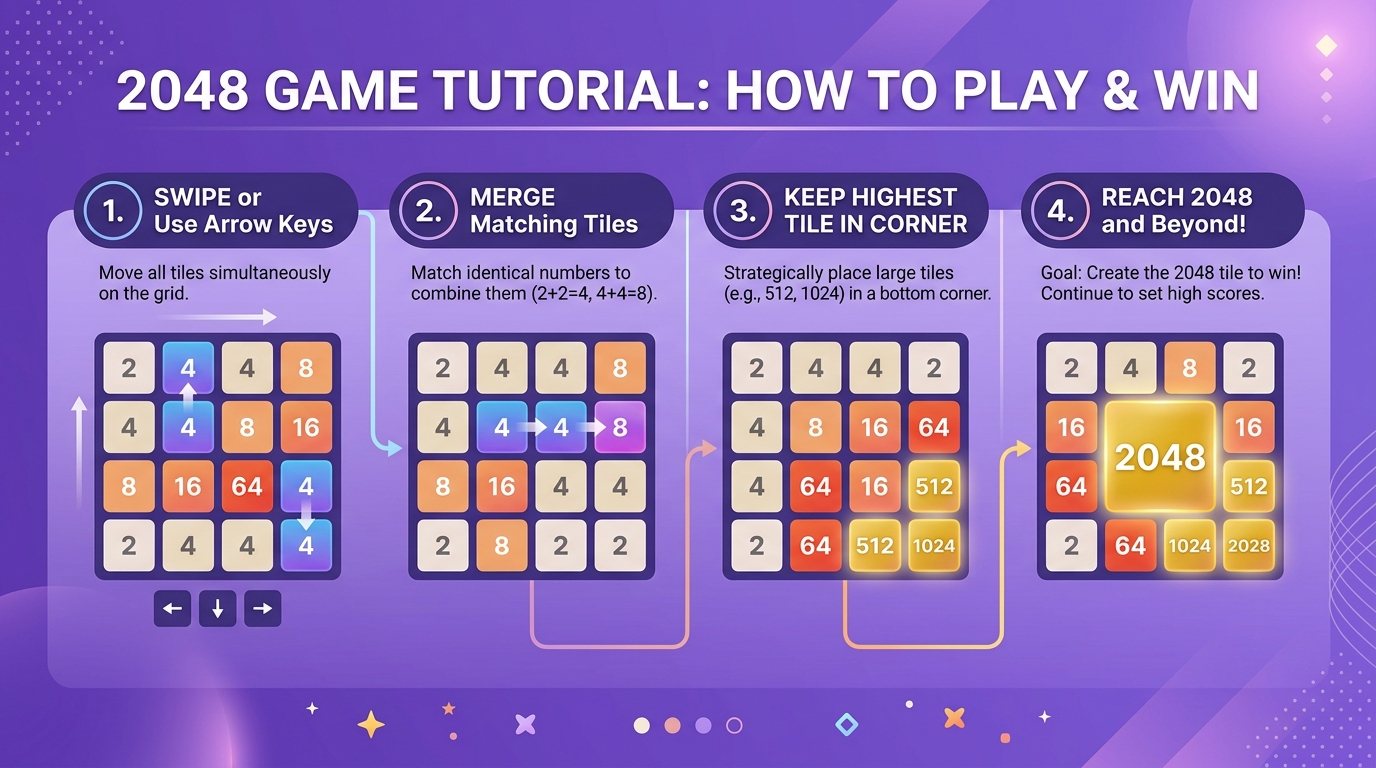
A 2048 board starts with two tiles already placed, always a pair of 2s or 4s in random empty cells. Every time you press an arrow key (or swipe on a touchscreen), the entire grid slides as far as it can in that direction. Whenever two tiles carrying the same number collide during a slide, they fuse into a single tile worth their combined value, and your score grows by that value. After every successful move, a new 2 or 4 (90 percent chance of 2, 10 percent chance of 4) appears in a random empty cell.

The game ends when no empty cell remains and no neighboring tiles share a value, meaning no further merges are possible. Reaching the 2048 tile triggers the win banner, but the board keeps going. A tile worth 2048 is only the official finish line; you can keep pushing to 4096, 8192, and beyond if the grid has room.

2. The Corner Strategy That Almost Always Wins

Skilled players do not swipe randomly. The most reliable approach is the corner strategy: choose a corner (most players pick the bottom-left) and keep your highest-value tile pinned there for the entire game. You accomplish this by only ever pressing two directions, for the bottom-left corner that means only down and left. The third and fourth directions are reserved for emergencies.

Because every slide pushes your big tile back into the corner, it never drifts away from where you anchored it. Smaller tiles stack up next to it in descending order, so when the chain of merges finally propagates inward toward the corner, all those small tiles fold into the big one in a single satisfying cascade.

3. Choosing a Grid Size That Suits You

The classic 2048 puzzle uses a 4x4 grid, which sits right at the edge of difficulty: tight enough that you must plan, large enough that a thoughtful player can reach 2048 most sessions. A 5x5 grid makes the game noticeably more forgiving. The extra row and column give you breathing room and let you stage more merges before the board fills up. A 6x6 grid is for high-score chasers who want to chase 4096 or 8192 without choking.

If you find yourself stuck on 4x4 before reaching the goal tile, drop down to 5x5 for a few rounds to internalize the corner strategy. Then come back. The smaller grid forces sharper play, and your scores will jump.

4. Using the Undo Button Wisely

Our 2048 lets you undo up to 10 prior moves. Undo is not a crutch, it is a planning tool. When you accidentally swipe in the wrong direction and your anchor tile slides out of the corner, undo instead of scrambling to recover. When a single merge forces a chain reaction that strands your biggest tile in the middle of the board, undo and try a different order.

Be aware that undo restores both the prior grid and the score you had at that point. So you cannot use it to walk back a wrong move and still keep the points gained there. Treat each undo as a fresh start from the chosen position.

Conclusion

2048 is one of those rare puzzle games where a small strategic insight, keeping your biggest tile in a corner and swiping using only two directions, turns a frustrating board into a satisfying cascade. ToolWise Free Online 2048 gives you the classic grid, fast keyboard and swipe controls, an undo buffer to recover from mistakes, and a persistent best score stored in your browser. Pick a grid size, swipe, and start climbing.

Frequently Asked Questions

How do I play 2048?
Use your arrow keys (or WASD, or swipe on mobile) to slide all tiles in one direction. When two tiles with the same number collide, they merge into one tile worth their sum. Keep merging until you reach the 2048 tile — and try to beat your best score.
What is the best score?
There's no fixed cap — you can keep merging past 2048 to higher tiles (4096, 8192…). Your personal best in this browser is saved and shown above the board.
Can I undo a move?
Yes. You can undo up to 10 prior moves. Undoing restores both the prior grid and the score you had at that point. Hitting undo after game-over also un-sticks the board.
Can I change the grid size?
Yes — switch between 4×4, 5×5, and 6×6 grids for harder or more forgiving puzzles. Larger grids give more room and easier merges but slower strategic payoff.

Related Tools

Spin Wheel
Random Number Generator
Coin Flip
Dice Roller
Typing Speed Test
Reaction Time Test

Related Guides

10 Fun Online Games to Play During Breaks
10 Free Tools Every Developer Needs in 2026
JSON Formatter Guide: Pretty-Print, Minify & Validate
Advertisement