The Complete Guide to SEO Meta Tags
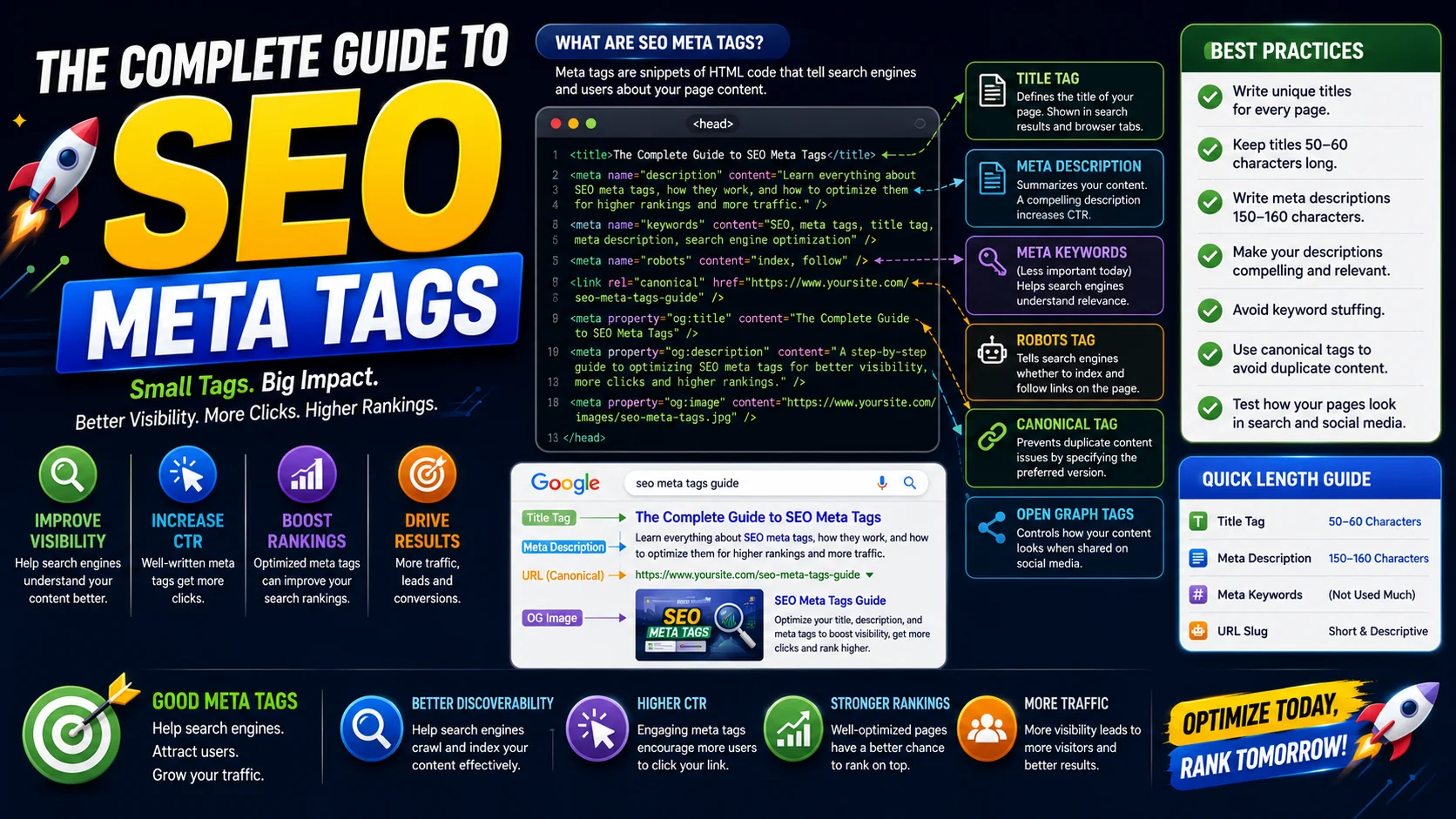
Meta tags are small, often-overlooked lines of HTML that decide how your pages appear in search results and on social media. They are the difference between a page that gets clicked and a page that gets scrolled past. This guide covers every tag that matters — from the title tag through Open Graph and Twitter Cards to structured data.
What Are Meta Tags?
Meta tags are HTML elements that provide metadata about your web page to search engines and social media platforms. They live in the <head> section of your HTML and are invisible to users browsing the page but crucial to the crawlers, parsers, and link-preview systems that index and share it.
Key Takeaway
Meta tags don’t directly drive rankings, but they heavily influence click-through rate (CTR) — which is itself a ranking signal. Well-crafted meta tags can double or triple your organic traffic from the same impressions.
Think of meta tags as the packaging around your content. The content itself still has to be good, but if the packaging is missing, generic, or misleading, far fewer people will ever open the page to find out.
Essential Meta Tags for SEO
Here are the must-have meta tags every page should have:
- Title Tag: The single most important on-page element for SEO, shown as the clickable headline in search results (aim for 50–60 characters).
- Meta Description: A short summary shown beneath the title in results, around 150–160 characters.
- Viewport: Ensures the page renders properly on mobile devices, which is essential since Google indexes the mobile version first.
- Robots: Controls whether search engines index the page and follow its links.
- Canonical: Tells search engines which URL is the preferred version of a page, preventing duplicate-content issues.
- Charset: Declares the character encoding (almost always UTF-8) so text renders correctly.
Title Tags: Best Practices
The title tag is the single most important on-page SEO factor. It is what users click in search results and what browsers show in their tab. Here is how to optimise it.
- Keep it under 60 characters so it does not get truncated.
- Put the primary keyword near the beginning.
- Include your brand name at the end, separated by a pipe or dash.
- Make it compelling — numbers, power words, and a clear benefit earn clicks.
- Make every page’s title unique; duplicated titles waste the opportunity to target different intents.
Meta Descriptions That Convert
Although not a direct ranking factor, meta descriptions heavily influence CTR — and that does feed back into rankings. Write descriptions that make users want to click, treating them like ad copy rather than a summary.
Good vs Bad Meta Descriptions
The good version names the verbs (format, validate, minify), picks up the reader’s intent (instantly, free, no signup), and lists concrete features. The bad version tells the crawlers nothing the title did not already say.
Open Graph Tags for Social Media
Open Graph (OG) tags control how your content appears when shared on Facebook, LinkedIn, WhatsApp, Slack, and most other platforms that generate link previews. Without them, the platforms guess — often badly — which title, description, and image to use.
You can handcraft these tags with the OG Tag Generator, or generate them together with the rest of your meta tags using the Meta Tag Generator, which also bundles schema markup.
Note that og:imagerequires an absolute URL — relative paths will not render in the preview. Recommended image size is 1200×630 pixels, with the title and description kept under 60 and 200 characters respectively for best display across networks.
Twitter Card Tags
Twitter Cards optimise how your content appears on X (formerly Twitter). The summary_large_image card type typically performs best because the large image dominates the feed and earns the most engagement.
When Twitter Card tags are missing, X falls back on your Open Graph tags, but adding explicit twitter:card tags gives you full control over which card type is rendered and guarantees a polished preview.
Schema Markup & Structured Data
Schema markup helps search engines understand your content beyond plain text and can earn you rich snippets in search results — star ratings, FAQ accordions, recipe cards, event listings, and more. These eye-catching results typically earn higher CTR than plain blue links.
Schema is written in JSON-LD, a small JSON object placed in a <script type="application/ld+json"> block in your page. The Meta Tag Generator can scaffold the basic FAQ, Article, and BreadcrumbList schemas so you do not have to write them by hand.
Common Mistakes to Avoid
- Keyword stuffing in the title or description — it reads as spam and earns lower CTR, not higher.
- Duplicated title and description tags across pages, which waste crawl budget and confuse intent.
- Missing viewport meta tag, which breaks mobile rendering and hurts mobile-first indexing.
- Relative Open Graph image URLs, which silently break link previews on most networks.
- Forgetting to add a canonical tag on parameterised URLs, creating duplicate-content problems.
- Ignoring how your page looks in the actual SERP — always preview at the pixel widths Google uses.
Verifying Your Tags Before You Publish
Writing the tags is only half the job; confirming that crawlers and social networks actually see them correctly is the other half, and it catches far more problems than you would expect. The fastest verification is the view-source of the rendered page — not the source of your template, but the HTML the browser receives after the framework renders it. If the tags exist in your component but not in the served HTML, they are invisible to everyone who matters.
- Check the served HTML, not your code. Client-rendered pages can ship empty or stale meta tags; always verify the final output.
- Use the platform debuggers. Facebook’s Sharing Debugger and X’s Card Validator re-scrape a URL and show you exactly which OG or Card tags they found — and force a refresh of a stale preview.
- Confirm absolute URLs. og:image and canonical values must be absolute; a relative path works in your browser and fails silently in a link preview.
- Look at the real SERP. Search for your exact title in Google to see whether it is truncated or rewritten, and adjust character counts accordingly.
Bridging to Rich Results with FAQ and Article Schema
Beyond the classic meta tags, structured data is what unlocks the richer, higher-click search appearances — the FAQ accordions, article-by-lines, breadcrumbs, and review stars that stand out against a page of plain blue links. The most immediately useful schema for a content site is FAQPage: it can surface your questions directly in the results, and it is one of the few structured types that consistently produces a visible enhancement.
The rules are strict and worth following. Only mark up content that is genuinely visible on the page — Google penalises schema whose text does not match what a visitor actually sees — and keep the question-and-answer pairs in the same order and wording as the page. Article schema, pairing your headline with a real author, publication date, and publisher entity, complements FAQ schema by helping Google associate the content with a named author and a trustworthy publication. Scaffolding both by hand is fiddly; a generator that emits them together — with the JSON-LD correctly escaped — removes the formatting mistakes that invalidate the markup.
A Maintenance Habit So Tags Never Rot
Meta tags decay silently. A page is published with good tags, then content is updated, the title is changed, the canonical URL migrates — and the tags quietly drift out of step with what the page has become. The fix is to treat tags as part of the page’s content, not a one-time setup step:
- Update the description when the content changes. A description of an old version of the page misleads the reader and wastes the click.
- Re-run a redirect check on canonical URLs. A canonical pointing to a URL that now redirects chains confusion for crawlers.
- Re-scrape after image changes. If you swap a hero image, force the social platforms to re-crawl or the old preview keeps circulating.
- Audit titles quarterly for truncation. Search engines change what they display periodically; a title that fit last quarter may be cut today.
Frequently Asked Questions
Does the meta description affect search rankings directly?
How long should my title tag and meta description be?
Why do my Open Graph images sometimes not show when I share a link?
Should every page have a unique title and description?
Are Twitter Cards still necessary if I have Open Graph tags?
Generate your meta tags in seconds
Use our free Meta Tag Generator to scaffold title tags, descriptions, Open Graph, Twitter Cards, and schema markup together — ready to paste into your HTML head.
Open the Meta Tag Generator →