Home

Writing & Content

AI Tools27Text Tools25PDF Tools24

Developer & Build

Developer Tools24File Converters9Color & Design18SEO & Web13

Media

Image Tools23Fun & Games27

Everyday

Calculators27Health & Fitness11Utility Tools12Time & Productivity9Lifestyle9
Browse all 258 tools
Guides

ToolWise

Free Online Tools

258+ free online tools for students, developers, designers, and professionals. No signup required. 100% free forever, and most tools run entirely in your browser for total privacy.

Browse by Category

  • AI Tools
  • Text Tools
  • PDF Tools
  • Image Tools
  • File Converters
  • Developer Tools
  • SEO & Web
  • Calculators
  • Color & Design
  • Time & Productivity
  • Lifestyle
  • Health & Fitness
  • Fun & Games
  • Utility Tools
  • All 258Tools →

AI & Text Tools

  • AI Summarizer
  • Grammar Checker
  • Paraphraser
  • Word Counter
  • Case Converter
  • AI Email Writer

Image & PDF Tools

  • PDF Merger
  • PDF Compressor
  • PDF to Word
  • Background Remover
  • Image Compressor
  • Image to Text (OCR)

Calculators & Dev

  • Compound Interest
  • BMI Calculator
  • SIP Calculator
  • Loan EMI Calculator
  • JSON Formatter
  • Regex Tester

Popular Guides

  • 10 Developer Tools
  • SEO Meta Tags Guide
  • Image Compression Guide
  • Secure Passwords Guide
  • Compound Interest Guide
  • JSON Debugging Guide

Company

  • All Tools
  • Topic Hubs
  • All Guides
  • About FreeToolWise
  • Our Founder
  • Editorial Policy
  • Contact

© 2026 FreeToolWise — 258+ Free Online Tools. All rights reserved.

Privacy PolicyTerms of ServiceEditorial PolicyContactX (@ToolWise86)

FreeToolWise offers 258+ free online tools — including an AI summarizer, grammar checker, paraphraser, JSON formatter, word counter, image compressor, background remover, PDF converter, QR code generator, BMI calculator, and many more browser-based utilities for students, writers, and developers. No signup, no usage limits — image, PDF and text tools run entirely in your browser, while our AI tools send your text to our server with the AI provider to generate the result. Each tool page states which one it is.

Gomoku 3D artwork
HomeToolsFun & GamesGomoku

Part of Online Browser Games

Fun & Games

Gomoku

Five in a row, fully free: pick a 9×9 to 19×19 board, set the computer from Easy to Hard, undo a blunder, play 2-player on one screen, or battle a friend online in a room you create with an invite link.

TA
Tanbir Ahamed·Founder of ToolWise · Software Engineer
Published September 2026

Interactive Tool Workspace

000 moves
Board
AI Blocks and attacks, but still slips sometimes.
Black to move

Game stats

Gomoku
AI difficulty
Medium
AI strength
70%

Blocks and attacks, but still slips sometimes.

Most wins

Gomoku rankings
Best: 0

Tip: Take the centre early — it touches four winning directions.

How to Use

  1. 1Choose vs Computer or Local 2P, or press “Play with a friend online” in the header for a room.
  2. 2Pick a board size from 9×9 to 19×19 and, vs the computer, an Easy, Medium or Hard opponent.
  3. 3Online: create a room and share the invite code/link, then the host starts when your friend joins.
  4. 4Tap any empty intersection to place your stone — connect five in a row to win.
  5. 5Undo rewinds your last move in local and vs-computer games; a full board is a draw.

Features

  • ✓Four board sizes: 9×9, 13×13, 15×15 and 19×19
  • ✓Easy, Medium and Hard computer opponents
  • ✓Three modes: Local 2P, vs Computer, and Online rooms
  • ✓Online rooms with invite code, shareable link, and presence
  • ✓Quick match joins players who are online right now
  • ✓Undo and a last-move marker in local and vs-computer games
  • ✓Lifetime stats, achievements and a settings sheet with sound options
  • ✓Canvas rendering, no images, tiny page weight
Comprehensive Guide & Reference

The Complete Guide to Gomoku: Five in a Row Strategy

Master boards from 9×9 to 19×19 with center control, double threats, and the blocking discipline that turns five stones into a win.
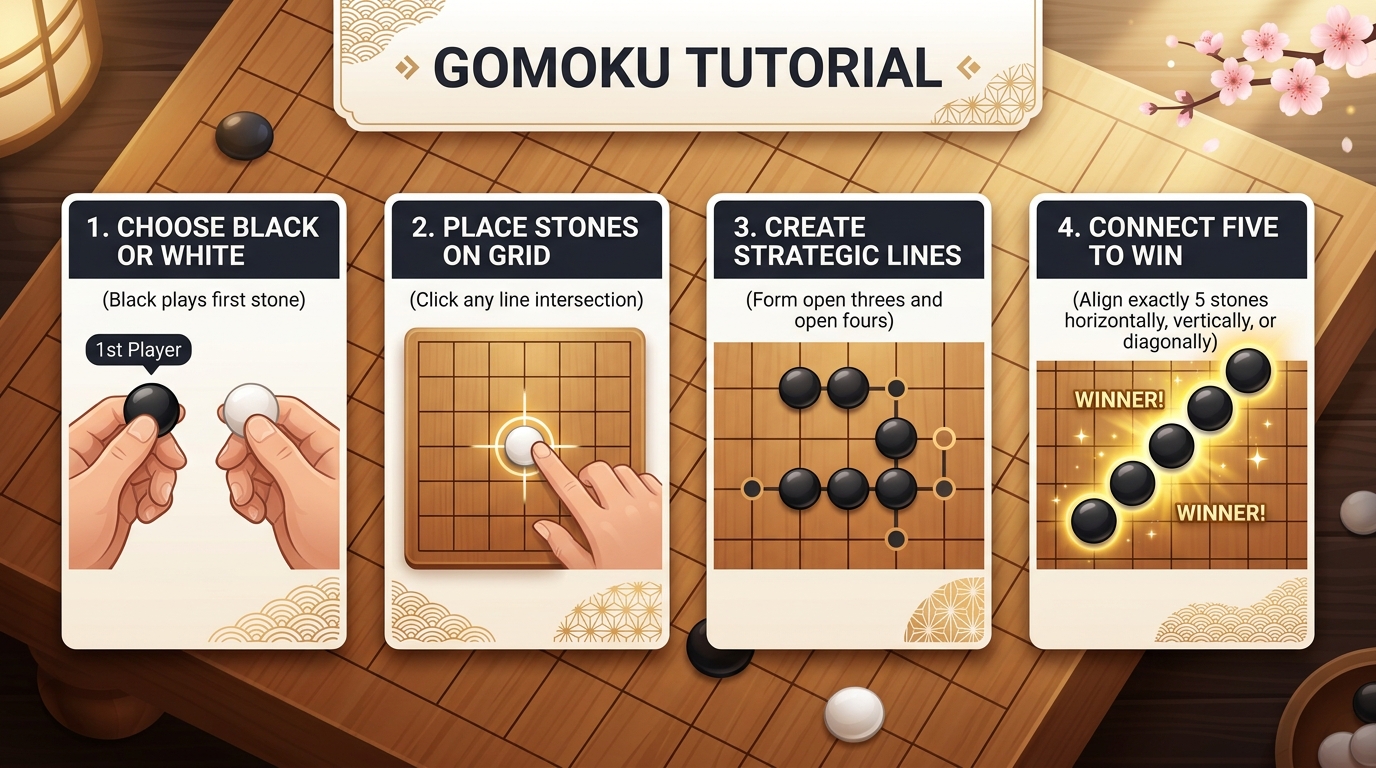
Gomoku Step-by-Step Guide: Choose Black or White, Place Stones on Grid, Create Strategic Lines, Connect Five to Win

How the Game Works

Gomoku is played on a square grid — choose 9×9, 13×13, 15×15 (the classic), or 19×19. Two players alternate placing stones — one black, one white — on empty intersections, and once placed a stone never moves. The first player to get five of their stones in a row wins immediately, and that line can run horizontally, vertically, or diagonally. If the board fills with no five in a row, the game is a draw.

The rules take a minute to learn, but the strategy runs deep: every stone stays on the board forever, so each placement shapes all future threats. The site offers three ways to play:

  • Local 2-player: share one device and pass it back and forth.
  • Vs Computer: pick Easy, Medium, or Hard — the AI hunts winning lines, blocks your fours, and slips more often on the lower difficulties.
  • Online rooms: private rooms with an invite code or link, plus Quick match for random opponents.

Undo is available in Local 2-player and Vs Computer games: it rewinds your last stone and, against the computer, the reply as well, so it is your turn again. Online matches are host-authoritative and never rewind — a misplaced stone has to be played around.

Opening Strategy: Fight for the Center

The opening decides how many directions your lines can grow — and direction is everything. A stone near the edge can only extend a few ways; a stone in the middle can extend in all of them.

  • Take the center first: a stone at the center can extend in eight directions — four straight and four diagonal. Central control is the single biggest opening advantage.
  • Stay close as player two: respond adjacent or diagonal to the first stone. Playing far away cedes the middle.
  • Keep stones connected: early stones should touch your other stones so lines can branch into forks later.

The Double Threat: Your Unstoppable Weapon

A single threat can be blocked. Two threats at once cannot — that is the endgame in one sentence. An open four with both ends empty completes on either end, so no single block stops it. But the most reliable win is the fork: one placement that creates two threats at once, such as an open four plus an open three, or two open threes. Your opponent can only answer one; you complete the other.

  • Build lines that cross: aim your stones so a future move sits at the intersection of two growing lines.
  • Think two stones ahead: picture where your next stone will land and what the two placements create together.
  • Sequence your threats: an open three forces a block, and that forced reply sets up your follow-up four. Forced moves let you dictate the board.

Blocking Tactics: Answer Every Open Threat

Defense wins as many games as offense. Never let a live threat mature while you chase your own plan.

  • Answer an open four immediately: it completes on either end, so ignoring it loses on the spot. This is the one non-negotiable block in the game.
  • Block simple fours next: a four with one end empty still completes unless you occupy that end.
  • Handle open threes early: an open three becomes an open four in a single move, so deal with it before it matures.
  • Count before you attack: scan for your opponent’s open threes before committing. Attacks that ignore a live threat hand the game over.

How Online Rooms Work

Online play puts a human on the other side of the same board — the host picks the size, plays black, and starts the match once the guest has joined.

  • Create a room: you receive an invite code and a shareable link. Send either to your friend; when they join, the host starts the match.
  • Quick match: skip the setup and get paired with a random waiting opponent instantly.

Practice against the computer, then take those tactics online — human opponents punish lazy blocks far faster.

Conclusion: Read the Whole Board

Gomoku rewards foresight over speed. Control the center so your lines can grow in every direction, build double threats instead of single ones, and answer every open threat before you attack. Do those three things and five in a row becomes a habit. Create a room, share the code, and put the strategy to work.

Privacy & data handling

This tool runs entirely in your browser. What you enter is processed on your own device using JavaScript and WebAssembly — it is not uploaded to our servers, and there is no account, no signup and no per-use limit. Read our privacy policy.

Frequently Asked Questions

How do I play Gomoku?
Players take turns placing a stone on any empty intersection. The first to get five stones in a row — horizontally, vertically, or diagonally — wins immediately. If the board fills with no five in a row, the game is a draw.
What board sizes can I play?
Four: 9×9, 13×13, 15×15 (the classic default) and 19×19. Changing the size starts a fresh board in the current mode; in an online room the host picks the size before the match starts.
Is there a computer opponent?
Yes — Easy slips often and mostly builds its own lines, Medium blocks and attacks but still makes mistakes, and Hard plays at full strength with near-perfect defence.
Can I play Gomoku with friends?
Yes. Local 2P passes one device back and forth, while Online rooms give you an invite code and a shareable link for a real-time match — or press Quick match to be paired with a waiting player.
Can I take a move back?
Undo is available in vs Computer and Local 2P: it restores the position before your last move and, against the computer, the reply too, so it is your turn again. Online matches are host-authoritative and do not rewind.
What happens if the board fills up?
The game is a draw — nobody connected five. Reset the board or rematch for another round.

Related Tools

Carrom
Air Hockey
Battleship
Tic-Tac-Toe
2048
Snake Game

Topical Collection

Explore all tools in Online Browser Games

View collection

Related Guides

10 Fun Online Games to Play During Breaks