Home

Writing & Content

AI Tools27Text Tools25PDF Tools24

Developer & Build

Developer Tools24File Converters9Color & Design18SEO & Web13

Media

Image Tools23Fun & Games27

Everyday

Calculators27Health & Fitness11Utility Tools12Time & Productivity9Lifestyle9
Browse all 258 tools
Guides

ToolWise

Free Online Tools

258+ free online tools for students, developers, designers, and professionals. No signup required. 100% free forever, and most tools run entirely in your browser for total privacy.

Browse by Category

  • AI Tools
  • Text Tools
  • PDF Tools
  • Image Tools
  • File Converters
  • Developer Tools
  • SEO & Web
  • Calculators
  • Color & Design
  • Time & Productivity
  • Lifestyle
  • Health & Fitness
  • Fun & Games
  • Utility Tools
  • All 258Tools →

AI & Text Tools

  • AI Summarizer
  • Grammar Checker
  • Paraphraser
  • Word Counter
  • Case Converter
  • AI Email Writer

Image & PDF Tools

  • PDF Merger
  • PDF Compressor
  • PDF to Word
  • Background Remover
  • Image Compressor
  • Image to Text (OCR)

Calculators & Dev

  • Compound Interest
  • BMI Calculator
  • SIP Calculator
  • Loan EMI Calculator
  • JSON Formatter
  • Regex Tester

Popular Guides

  • 10 Developer Tools
  • SEO Meta Tags Guide
  • Image Compression Guide
  • Secure Passwords Guide
  • Compound Interest Guide
  • JSON Debugging Guide

Company

  • All Tools
  • Topic Hubs
  • All Guides
  • About FreeToolWise
  • Our Founder
  • Editorial Policy
  • Contact

© 2026 FreeToolWise — 258+ Free Online Tools. All rights reserved.

Privacy PolicyTerms of ServiceEditorial PolicyContactX (@ToolWise86)

FreeToolWise offers 258+ free online tools — including an AI summarizer, grammar checker, paraphraser, JSON formatter, word counter, image compressor, background remover, PDF converter, QR code generator, BMI calculator, and many more browser-based utilities for students, writers, and developers. No signup, no usage limits — image, PDF and text tools run entirely in your browser, while our AI tools send your text to our server with the AI provider to generate the result. Each tool page states which one it is.

Battleship 3D artwork
HomeToolsFun & GamesBattleship

Part of Online Browser Games

Fun & Games

Battleship

Sink your friend's fleet in classic Battleship. Play online with a room code, vs the computer, or pass-and-play on one screen with secret placement.

TA
Tanbir Ahamed·Founder of ToolWise · Software Engineer
Published September 2026

Interactive Tool Workspace

Next: Aircraft Carrier (5)
10×10 grid · 5 ships (5, 4, 3, 3, 2)
Grid
Fleet
You — place your aircraft carrier (5 cells →)
ABCDEFGHIJ12345678910
Click any cell to place your ship. Ships cannot overlap or touch the grid edge once placed.

Game stats

Battleship
Aircraft Carrier (5)
Battleship (4)
Cruiser (3)
Cruiser (3)
Destroyer (2)

Fewest shots to win

Battleship rankings

Tip: Sweep on a checkerboard pattern first — every ship of length 2+ must touch one of those squares.

How to Use

  1. 1Place your fleet on the chosen grid — 8×8, 10×10 or 12×12 — or shuffle to place automatically.
  2. 2Tap the enemy grid each turn to fire at a coordinate.
  3. 3A red dot is a hit; a gray dot is a miss. Sink the whole enemy fleet to win.
  4. 4Online: the host sets the grid and fleet, then both players press Ready to fight — the battle starts automatically once both fleets are placed.
  5. 5Local mode covers the screen between turns so placements stay secret.

Features

  • ✓Three modes: vs Computer, Local 2P, and Online rooms
  • ✓Host-configurable grid (8×8, 10×10, 12×12) and Small, Classic or Large fleet presets
  • ✓Vs Computer battles give you a 50-shot allowance — run dry and you can load Extra Shots from the store or surrender; local and online battles stay unlimited
  • ✓CPU with hunt-and-target behavior after hits
  • ✓Secret placement in pass-and-play mode via cover screens
  • ✓Room codes and invite links for real-time online duels
  • ✓Lifetime stats, achievements and a settings sheet with sound options
Comprehensive Guide & Reference

The Complete Guide to Battleship Strategy

Master fleet placement, probability, and the checkerboard trick to hunt every fleet — from a small 8×8 skirmish to a six-ship armada on 12×12.
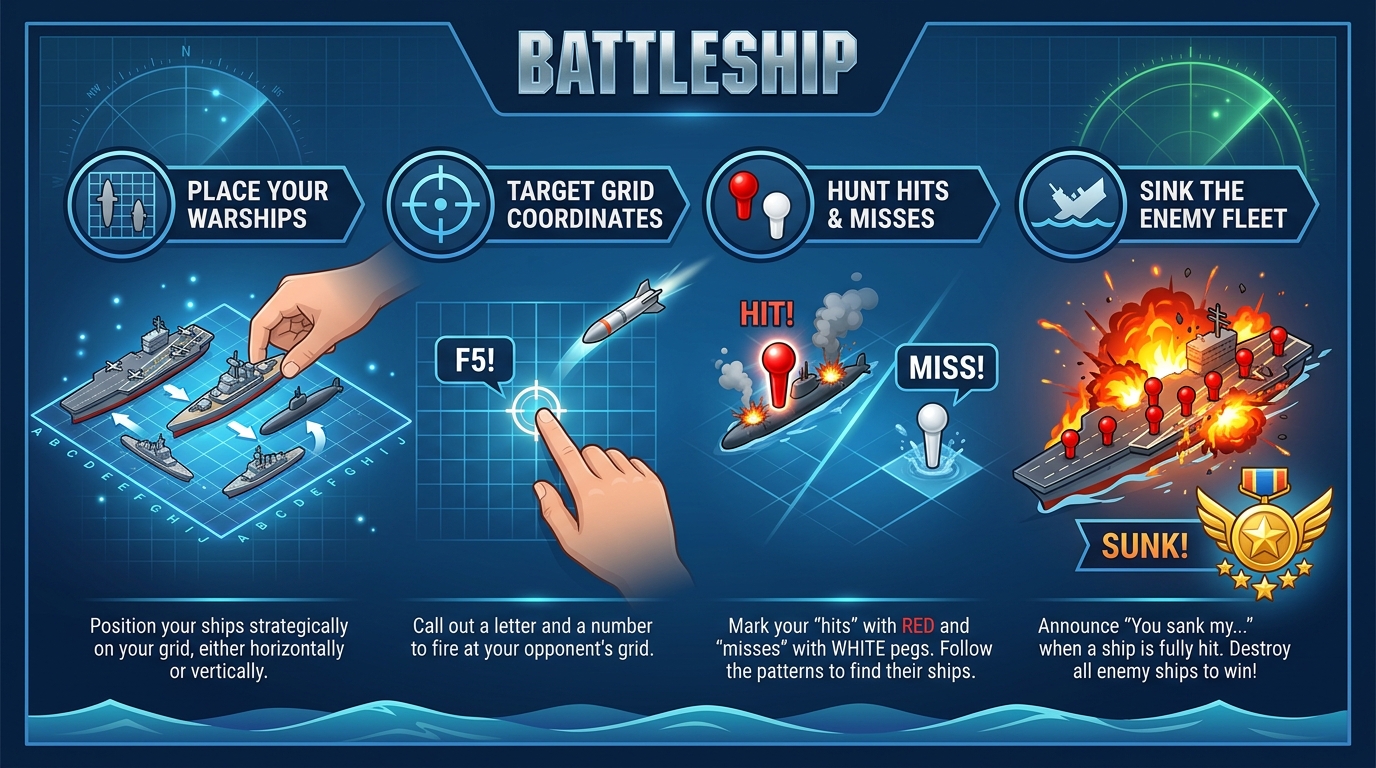
Battleship Step-by-Step Guide: Place Your Warships, Target Grid Coordinates, Hunt Hits & Misses, Sink the Enemy Fleet

Placement Strategy: Spread Out and Stay Unpredictable

Battleship is a duel of hidden fleets. Each player secretly places a fleet on a hidden grid — 8×8, 10×10 or 12×12 — chosen by the host in online rooms or by the player in local and vs-computer games. Fleets come in three presets: Small (4, 3, 3, 2), Classic (5, 4, 3, 3, 2) and Large (5, 4, 4, 3, 3, 2). You then take alternating shots, each call answered by a hit, a miss, or a sunk ship. Sink the whole fleet to win, and your placement is a signal that bad habits punish quickly.

  • Never cluster your ships: once your opponent finds one ship, they keep firing around it — and a touching neighbor is found almost for free. Keep empty water between ships so one discovery stays contained.
  • Avoid the classic edges-only pattern: beginners hug the outer ring and corners because it feels safe — exactly why experienced players sweep the border first. Mix your ships through the interior.
  • Leave decoy gaps: leave a tempting lane where a ship looks like it belongs, then place your real ships elsewhere. Opponents will waste several shots proving your decoys empty.
  • Use the cover screen in Local 2P: pass-device cover screens keep each placement secret — arrange your fleet calmly, and look away while your opponent does the same.

Probability Basics: The Center Holds the Advantage

Not every square is equally likely to hide a ship. Ships lie horizontally or vertically, so a cell near the middle touches more lines of possible placements than a corner, which can only anchor a ship in two directions. Center cells have more ways to belong to a ship, making the middle of the board the densest hunting ground.

In practice, opening volleys belong in the middle of the grid, not on the edges — when you know nothing, work inward and let the math aim.

The Parity Trick: Fire Like a Checkerboard

The most powerful habit in Battleship is firing by parity. Picture the grid as a checkerboard, where a square’s color depends on whether its row and column add up to an even or odd number. Because even the smallest ship — the 2-cell Destroyer — is two cells long, every ship must cover at least one square of each color. A full sweep of one color is guaranteed to touch every ship, roughly halving the shots you need before your first hit.

Once you hit, expand to the neighboring squares to finish that ship; once it sinks, drop back to your parity scan where you left off — that discipline is what makes the trick pay.

Reading Your Opponent's Misses

Misses are information, not dead ends. A stream of misses clustered in one region tells you your opponent believes ships live there, and the shape of their search reveals how experienced they are — an edges-first sweeper is following the beginner script, while tight shots around their own hits mean they have found something real.

In vs Computer mode, the CPU hunts the neighbors of every cell it hits, so its fire piles up around any ship it touches — one more reason your fleet should never sit in clusters. Against a human, use the map their misses draw and fire where their attention isn't.

How Online Rooms Work

Online rooms recreate the hidden-board duel over any distance, with the rules unchanged.

  • The host sets the board: the host picks the grid size and fleet preset for the room, and can change them between battles. Both players always fight on the exact same setup.
  • Create a room and share the invite: the host passes the invite code or link to the guest, and the battle starts automatically once both players have placed their fleets and pressed Ready to fight.
  • Only hit and miss results are shared: ship positions never leave your device, so there is nothing to peek at and no way to cheat.
  • Classic rules apply: alternating shots, a hit or miss after every call, and victory the moment the whole enemy fleet is sunk.
  • Rematches need both players: after a battle, Play again waits until your opponent accepts too, then both fleets reset to secret placement.

Discipline Beats Luck on the Grid

Battleship rewards discipline far more than luck. Place your fleet spread out and unpredictable, hunt the center first, commit to the checkerboard scan, and treat every miss as a clue about the mind across the table. In online rooms, remember that only hits and misses are shared — the information gap is the game. Build those habits and you will sink the whole enemy fleet long before a lucky guess decides otherwise.

Privacy & data handling

This tool runs entirely in your browser. What you enter is processed on your own device using JavaScript and WebAssembly — it is not uploaded to our servers, and there is no account, no signup and no per-use limit. Read our privacy policy.

Frequently Asked Questions

How do you play Battleship?
Place your fleet on a hidden grid — 8×8, 10×10 or 12×12 — then take turns calling coordinates to fire at the enemy grid. Fleets come in three presets: Small (4, 3, 3, 2), Classic (5, 4, 3, 3, 2) and Large (5, 4, 4, 3, 3, 2). A ship with no surviving cells is sunk — sink the whole enemy fleet first to win. Online, the host picks the grid and fleet for both players.
Can I play Battleship with friends?
Yes — choose Online, create a room, and share the invite link or code. Your friend joins, you each place your ships in secret on the host's grid and fleet, and the battle starts automatically once both players press Ready to fight. Play again after a match starts a rematch both players must accept.
Does the opponent see my ship positions?
No. Everything about where your ships are stays on your own device. Only hit/miss results are exchanged, and pass-and-play covers the screen between turns.
How does the computer opponent work?
The CPU places its ships randomly and fires at random until it scores a hit, then hunts the neighboring cells until the target is sunk.

Related Tools

Carrom
Air Hockey
Gomoku
Tic-Tac-Toe
2048
Snake Game

Topical Collection

Explore all tools in Online Browser Games

View collection

Related Guides

10 Fun Online Games to Play During Breaks