
Home

Writing & Content

AI Tools27Text Tools25PDF Tools24

Developer & Build

Developer Tools24File Converters9Color & Design15SEO & Web13

Media

Image Tools23Fun & Games18

Everyday

Calculators27Health & Fitness11Utility Tools12Time & Productivity9Lifestyle9
Browse all 246 tools
Guides

ToolWise

Free Online Tools

246+ free online tools for students, developers, designers, and professionals. No signup required. 100% free forever, and most tools run entirely in your browser for total privacy.

Browse by Category

  • AI Tools
  • Text Tools
  • PDF Tools
  • Image Tools
  • File Converters
  • Developer Tools
  • SEO & Web
  • Calculators
  • Color & Design
  • Time & Productivity
  • Lifestyle
  • Health & Fitness
  • Fun & Games
  • Utility Tools
  • All 246Tools →

AI & Text Tools

  • AI Summarizer
  • Grammar Checker
  • Paraphraser
  • Word Counter
  • Case Converter
  • AI Email Writer

Image & PDF Tools

  • Background Remover
  • Image Compressor
  • Image to Text (OCR)
  • PDF to Text
  • Text to PDF
  • YouTube Thumbnail

Calculators & Dev

  • Compound Interest
  • BMI Calculator
  • SIP Calculator
  • Loan EMI Calculator
  • JSON Formatter
  • Regex Tester

Popular Guides

  • 10 Developer Tools
  • SEO Meta Tags Guide
  • Image Compression Guide
  • Secure Passwords Guide
  • Compound Interest Guide
  • JSON Debugging Guide

Company

  • All Tools
  • All Guides
  • About ToolWise
  • Our Founder
  • Editorial Policy
  • Contact

© 2026 ToolWise — 246+ Free Online Tools. All rights reserved.

Privacy PolicyTerms of ServiceEditorial PolicyContact

ToolWise offers 246+ free online tools — including an AI summarizer, grammar checker, paraphraser, JSON formatter, word counter, image compressor, background remover, PDF converter, QR code generator, BMI calculator, and many more browser-based utilities for students, writers, and developers. No signup, no upload, no limits.

Advertisement
HomeToolsFun & GamesMemory Match
Fun & GamesGame

Memory Match

Train your short-term memory — flip emoji cards, find matching pairs, and race the clock. Three difficulty levels, a live timer, a move counter, and a saved best record. No signup, instant play.

TA
Tanbir Ahamed·Founder of ToolWise · Software Engineer
Published July 2026Updated August 2026

Interactive Tool Workspace

0:00 0 moves —

Memorize the board... cards flip back shortly

How to Use

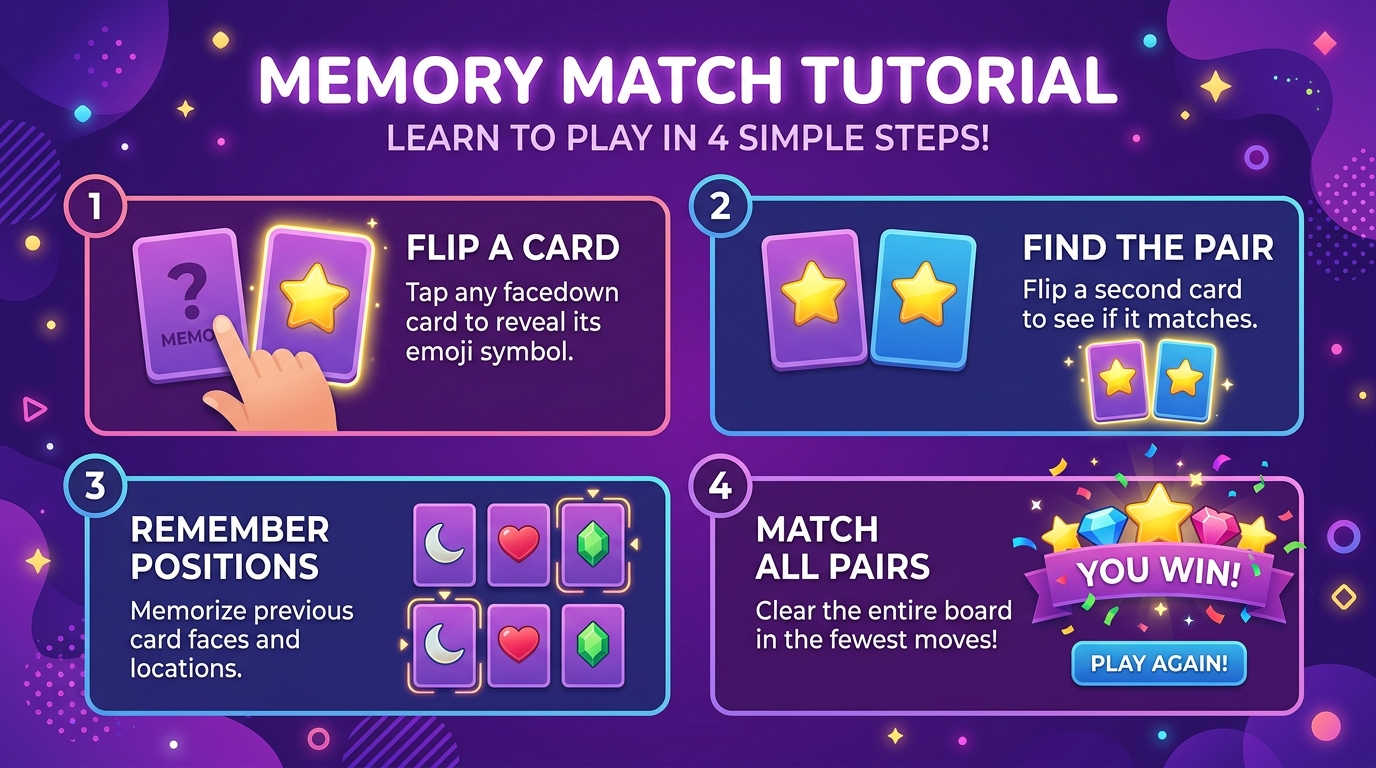
  1. 1Pick a difficulty (6, 8, or 12 pairs).
  2. 2Glance at the 1.5-second preview of the board.
  3. 3Click any card to flip it face-up.
  4. 4Flip a second card — match the emoji to keep them both face-up.
  5. 5Reveal all pairs to win; aim for the fewest moves and fastest time.

Features

  • ✓Three difficulty levels (easy / medium / hard)
  • ✓Real 3D card-flip animation with distinct back/face
  • ✓1.5-second preview peek at the start of each round
  • ✓Live timer and move counter
  • ✓Best moves (and time) saved per difficulty
  • ✓Anti-cheat: disabled double-flips and matched cards
Comprehensive Guide & Reference

The Complete Guide to Memory Match and Training Your Working Memory

Learn the rules of the classic concentration game, the strategy that lets you win with fewer moves, and how grid size affects the optimal play style.
1. How Memory Match Is Played

Memory Match (also known as Concentration or Pairs) is a card-flipping game. The game lays a deck of cards face down on a grid. Each turn you flip two cards. If they match in symbol or color, they stay revealed permanently. If they do not match, both flip back over after a short delay. You win when every card has been paired. The score is the number of moves you took; fewer is better.

Because cards you reveal and then flip back stay literally visible to you, watching them is the entire skill. Every wrong flip is not just a miss, it is information. The trick is to put that information into your memory before you flip the next card.

2. The Two-Phase Strategy That Beats Every Grid

Optimal play has two phases. In the reconnaissance phase, you flip pairs of unknown cards even when you know they will not match. The goal is to reveal as many distinct cards as possible while building a mental model. Treat each wrong flip as a free reveal of two positions, not a wasted turn. In the collecting phase, you use the model: any time you flip a new card and remember a match for it somewhere on the grid, you collect that pair immediately. Every new reveal in the collecting phase should produce a known match.

A common mistake is to stop flipping new cards too early. If you switch into pure collecting before you have seen most of the deck, you will flip cards blindly because your model has gaps. Roughly two-thirds of the deck should be known before you stop flipping new pairs.

3. How Grid Size Changes the Game

On a 4x4 grid (8 pairs) the entire deck fits inside most adults' working memory. A few plays of practice and you can two-phase the board realistically moving under 16 flips. On a 6x6 grid (18 pairs) the working-memory load approaches the limit for most humans, and you have to start grouping cards by region or by symbol category rather than remembering individual cells. On an 8x8 grid you need a system: divide the grid into quadrants and reconnaissance one quadrant at a time, holding each match in short-term memory long enough to collect it.

4. Memory Tricks That Help on Bigger Boards

  • Name cards aloud. Saying the symbol name in your head as you flip a card anchors it more firmly than merely seeing it.
  • Use position anchors. Mentally label each card by quadrant (top-left, bottom-right) so you fix both symbol and position in a single memory slot.
  • Group similar symbols. If four cards share a color or category, treat them as a group and watch which sub-position each occupies.

Conclusion

Memory Match rewards attention more than reflex. The two-phase strategy, reconnaissance then collecting, plus a grid-size-appropriate memory-load discipline gives you near-optimal play on the smallest boards and a fighting chance on the biggest. ToolWise Free Online Memory Match gives you adjustable grid sizes, instant flips, and the best moves count saved in your browser. Pick a grid size, slow down, and watch the deck reveal itself to you.

Frequently Asked Questions

How do I play Memory Match?
Click two cards to flip them face-up. If they show the same emoji, they stay flipped. If not, they flip back. Match every pair to win — the fewer moves and less time, the better.
What do the difficulty levels do?
Easy has 6 pairs (12 cards, 4×3), Medium has 8 pairs (16 cards, 4×4), and Hard has 12 pairs (24 cards, 6×4). Bigger grids need sharper recall. There is a best-moves record saved per difficulty.
Why are all the cards shown for a moment at the start?
A 1.5-second preview lets you glance at the layout before the cards flip back — handy as a memory aid and fairer on harder grids. Once the preview fades you can start flipping.
Is my best score saved?
Yes — the fewest-moves (then fastest-time) record for each difficulty is stored in localStorage on this device and restored next visit. Clear your browser storage to reset it.

Related Tools

Spin Wheel
Random Number Generator
Coin Flip
Dice Roller
Typing Speed Test
Reaction Time Test

Related Guides

10 Fun Online Games to Play During Breaks
10 Free Tools Every Developer Needs in 2026
JSON Formatter Guide: Pretty-Print, Minify & Validate
Advertisement