Word Counter Guide: Character Limits, SEO Density & Readability
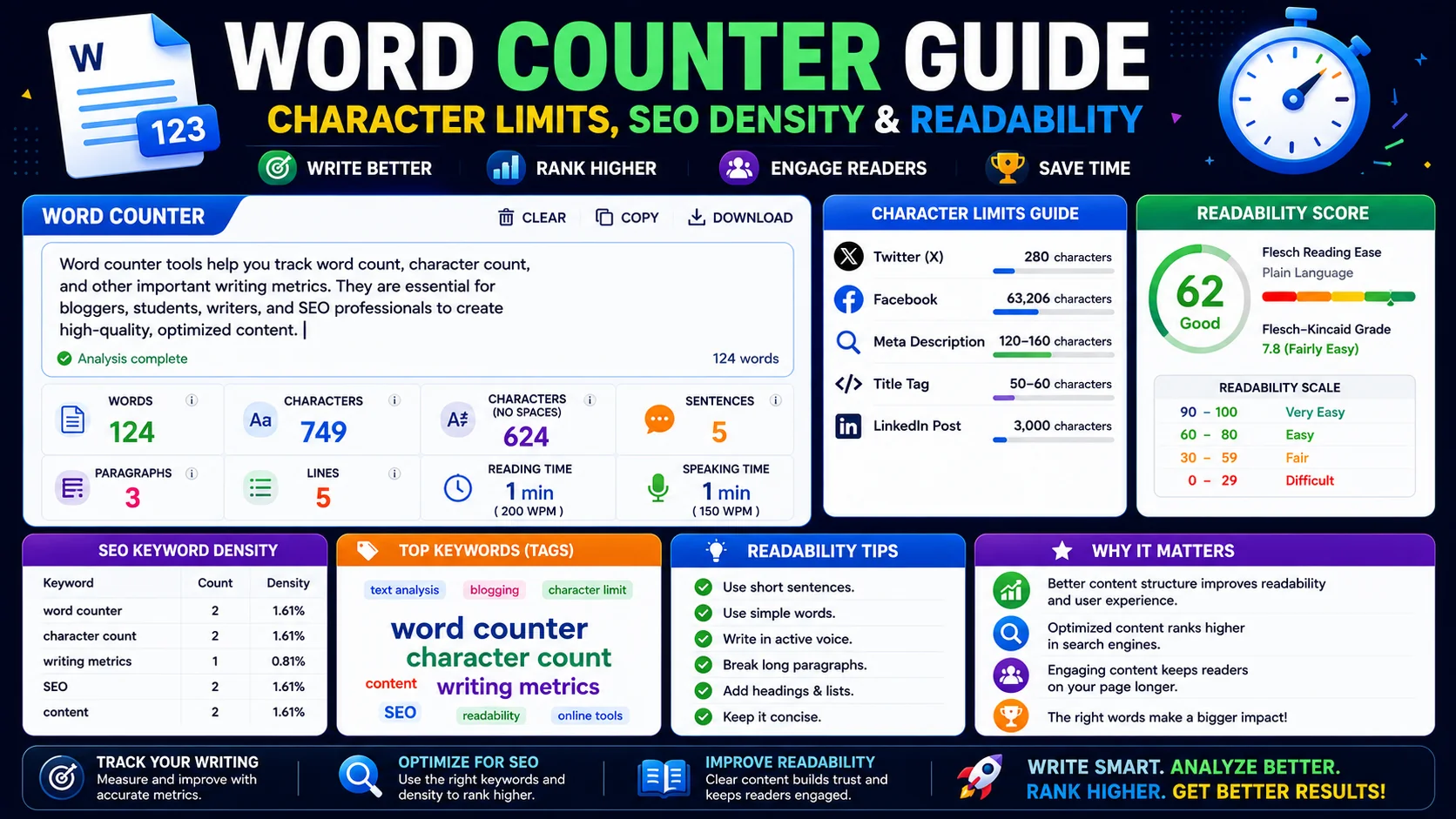
A word counter is sold as a simple tally, but the useful one measures far more than a single number. Character limits, keyword density, reading time, and readability scores all live inside the same text — and knowing how to read each one is what separates a casual paste-and-look from a writer who actually ships polished work.
Why Word Counting Goes Beyond a Tally
Every platform that publishes text — a university submission system, a tweet, a Google search snippet, a patent filing — enforces a hard size limit written into its rules. Miss the limit and the platform truncates you, rejects you, or silently breaks your formatting. A counter that returns one number is enough when you only need to know “is this under 2,000 words?” A counter that returns a dozen metrics lets you tailor the same body of text to several platforms at once without guessing.
The metrics that matter in practice are: total words, characters with and without spaces, sentences, paragraphs, syllables, reading and speaking time, keyword density, average words per sentence, and a readability score. Each answers a different question about your text, and a good counter surfaces all of them in real time as you type.
Character Limits That Actually Matter
| Platform | Limit | What gets truncated |
|---|---|---|
| Twitter / X (standard) | 280 chars | Hard cut — tweets over 280 cannot be posted |
| Google SEO title tag | ~50–60 chars | Truncated with an ellipsis in search results |
| Google meta description | ~150–160 chars | Snippet is cut, lowering click-through |
| Instagram caption | 2,200 chars | “Read more” fold after 125 chars |
| LinkedIn post | 3,000 chars | “See more” after ~210 chars |
| YouTube description | 5,000 chars | Only first ~125 chars show before “Show more” |
The lesson is that two limits apply to almost every platform: the hard cut and the soft fold. The hard cut is the absolute maximum the platform accepts. The soft fold is the point at which the UI hides the rest behind a button. A great caption lives within the fold; a merely-acceptable caption sits somewhere under the hard cut.
Keyword Density and SEO
Keyword density is the percentage of times a specific word appears relative to the total content words. In the early 2000s, writers repeated their target keyword dozens of times to manipulate rankings — modern search engines now penalise that practice as keyword stuffing. A natural density sits between 1% and 3% for the primary term.
A serious density report filters out stop words (the, and, is, of, to) so the chart surfaces thematic content words rather than grammar glue. If your top ten words are dominated by the target keyword and its close synonyms, the page is on-topic. If the top words are scattered and unrelated, you have not signalled what the page is about — readers and crawlers will both leave confused.
Reading and Speaking Time Estimates
Word count is directly tied to time, and time is the constraint that actually governs whether a reader finishes your piece or a presenter hits their slot.
- Reading time (200 words per minute): the average adult reads silently at 200–250 WPM. Use this number to decide how long a blog post takes to consume. A 2,000-word guide reads in roughly 10 minutes — the point at which most readers decide whether to commit or skim.
- Speaking time (130 words per minute): when presenting aloud with natural pauses, the rate drops. A 5-minute conference slot comfortably holds about 650 spoken words; pushing past 750 forces you to rush. Use the speaking-time metric to scope scripts before you record.
Readability Scores: Flesch and Grade Level
Two formulas convert your word and sentence stats into a measure of how hard the text is to read:
Both formulas reward short sentences and short words. A general-audience blog post should land around a Flesch Reading Ease of 60–70 (roughly 8th–9th grade). Academic writing drifts down to 30–50, and very simple copy climbs above 80. If your score is stuck low, the highest-leverage fix is almost always to break long sentences — each sentence you split raises the score faster than swapping vocabulary.
The grade-level estimate is the same data expressed as a US school grade. A “Grade 10” result means a typical 15-year-old can read it without strain. For mass-market content, aim for Grade 7–9; for specialist audiences, Grade 12–14 is acceptable as long as the topic genuinely requires the vocabulary.
Sentence and Paragraph Structure as Trailing Signals
Word count is the metric everyone asks for, but the numbers hiding just behind it — average sentence length, paragraph count, and the spread between your shortest and longest sentences — are a better predictor of whether your writing is actually readable. A 2,000-word article whose sentences all run 40 words is a slog regardless of its length, while the same word count split into varied sentences and short paragraphs feels effortless.
The practical target is variety rather than any single number. Aim for an average sentence length in the low-to-mid teens for general audiences, and use the occasional very short sentence for emphasis — the counter reads the averages, but your reader feels the rhythm. If every paragraph is a wall of five or more sentences, break them up; shorter paragraphs lower the perceived effort of reading, which is a quiet but real contributor to whether someone finishes the page.
Why Your Counter Disagrees With Every Other Tool
Ask three word counters to count the same paragraph and you will often get three slightly different answers. That is not a bug in any of them — it is a disagreement about what counts as a word. The divergence comes down to a few well-known edge cases:
- Hyphenated compounds. “well-known” is one word to some counters and two to others.
- Contractions. “don’t” and “it’s” count as one word in most tools, though a minority split them.
- Numbers and symbols. “2026” and “$1,000” may or may not be treated as words depending on the tokenizer.
- Emoji and standalone punctuation. Stray marks between words get counted by some engines and ignored by others.
For compliance with a hard limit, always use the same tool the platform will use — or stay a safe margin under the cap so the discrepancy cannot cost you. For general drafting, pick one counter and treat it as your consistent reference rather than chasing an absolute truth across tools.
Setting Word Counts by Goal, Not Guesswork
“How long should this be?” has no single answer, but each format has a range where its audience expects it to live. A blog post that runs 300 words feels thin; a 4,000-word product page overstays its welcome before anyone scrolls to the price. The counter lets you hit those ranges deliberately instead of discovering at the end that you overshot or undershot.
| Asset | Typical range | Why it matters |
|---|---|---|
| Meta description | 150–160 chars | Truncation cuts your message mid-sentence |
| Blog post | 1,200–2,500 words | Long enough to rank, short enough to finish |
| Email subject line | 30–50 characters | Mobile clients truncate beyond this |
| Social post | 80–280 chars | The fold hides everything after the cut |
Frequently Asked Questions
How is reading time calculated?
What is a healthy keyword density for SEO?
Should spaces be counted as characters?
What is Flesch Reading Ease and what number should I aim for?
Does a word counter store my text anywhere?
Why does my counter disagree with Microsoft Word?
Count, analyse, and export in real time
Paste your text — or upload a PDF/DOCX — and the ToolWise Word Counter shows word count, character limits for seven platforms, keyword density, readability scores, and reading and speaking time, all locally in your browser.
Open Word Counter →