How to Generate Secure Passwords
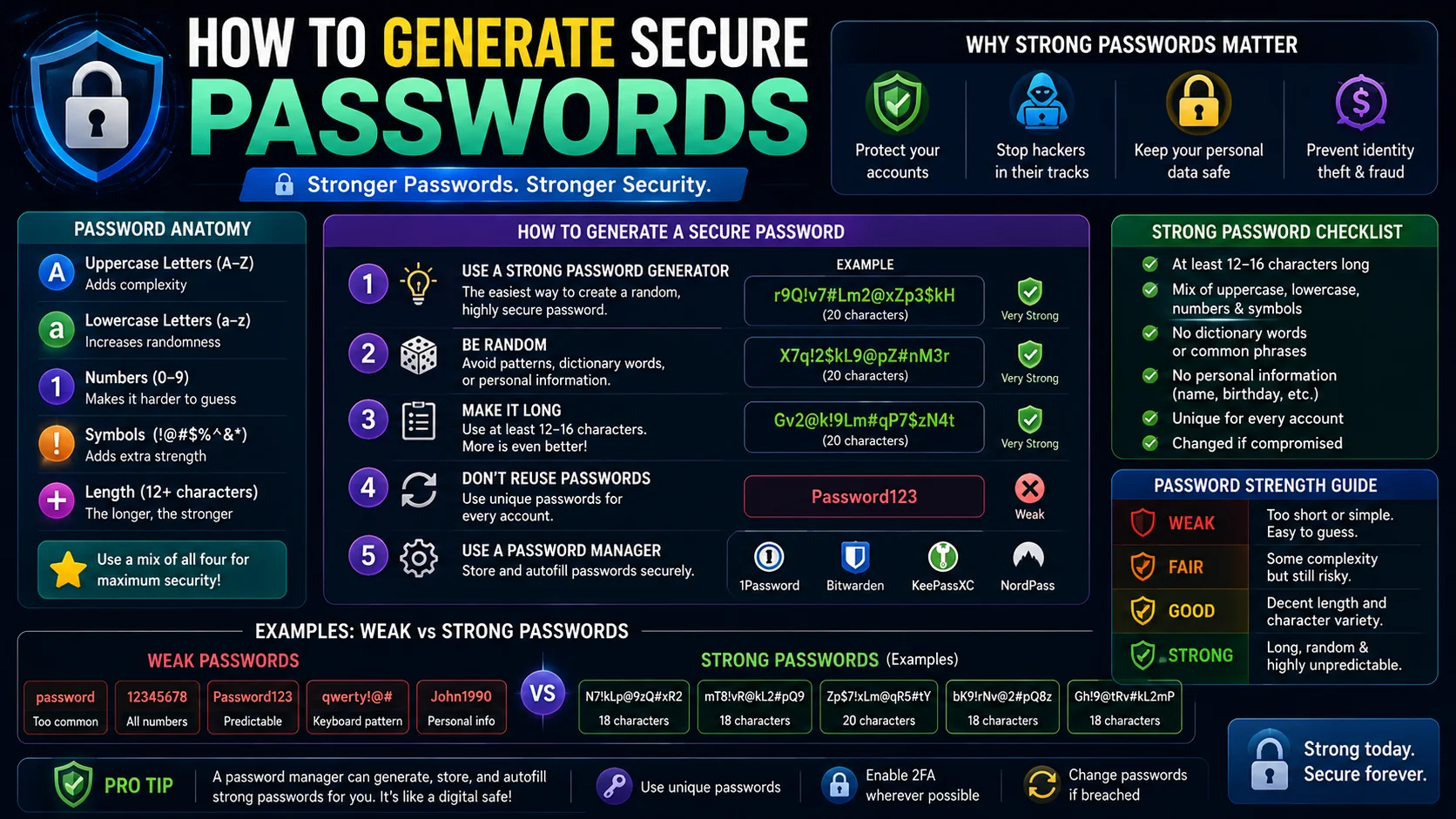
In our digitized world, passwords remain the primary lock on our private lives. Yet, millions of people continue to use weak, reusable credentials, exposing themselves to identity theft and account breaches.
Why Weak Passwords Are Easy to Hack
Hackers rarely guess passwords manually anymore. They use automated software that can test billions of combinations per second. The two most common hacking strategies are:
- Dictionary Attacks: Hacking scripts cross-reference massive databases of common words, phrases, and leaked credentials. If your password is "baseball2025" or "P@ssword123", it will be broken instantly.
- Brute-Force Attacks: Computer algorithms systematically try every possible key combination. A short password consisting of only numbers or lowercase letters can be brute-forced in milliseconds.
- Credential Stuffing: After a major site breach, attackers replay leaked email/password pairs on hundreds of other services. Reusing passwords is what makes this attack devastating.
The Math: Password Entropy Explained
Password strength is measured in bits of entropy. The formula is:
Crack Time by Length & Character Set
Let's compare the time to crack passwords of varying lengths and character sets, assuming a powerful attacker capable of 10 billion guesses per second:
| Length | Lowercase only (26) | Mixed + Digits (62) | Full keyboard (94) |
|---|---|---|---|
| 6 | Seconds | Seconds | Minutes |
| 8 | Hours | Days | Months |
| 10 | Months | Decades | Centuries |
| 12 | Decades | Millennia | Thousands of years |
| 16 | Centuries | Millions of years | Billions of years |
| 20 | Thousands of years | Trillions of years | Practically uncrackable |
The takeaway is simple: length beats complexity. A 16-character random password from the full keyboard is virtually uncrackable with today's hardware.
How to Create Secure Passwords
To protect your personal data, adopt these strict password rules:
- Never Reuse Passwords: If one website gets breached, hackers will test that exact email/password combination on major sites like Google, Amazon, and bank portals. Unique credentials per site eliminate this entire attack vector.
- Use Cryptographic Randomness: Do not base passwords on personal information like birthdays, pet names, or street addresses. These can be discovered on social media. Use a password generator (such as the ToolWise Password Generator) that taps the Web Crypto API.
- Aim for 16+ Characters: Modern guidance is to prefer length over symbol substitution. A 16-character random string is unbreakable; an 8-character "P@ssw0rd!" is not.
- Implement Passphrases When Memorable: If you need to memorize a password, combine 4 or 5 random, unrelated words (e.g.
correct-horse-battery-staple). They are easy for humans to remember, but impossible for computers to guess. - Enable Two-Factor Authentication (2FA): Even a strong password can leak. A second factor (authenticator app or hardware key) makes a stolen password useless on its own.
How to Manage Hundreds of Passwords
Memorizing hundreds of secure passwords is humanly impossible. The industry standard recommendation is to use a reputable Password Manager. Here is how the leading options compare:
| Manager | Hosting | Free Plan | Best For |
|---|---|---|---|
| Bitwarden | Cloud (open source) | Unlimited passwords | Privacy-conscious users |
| 1Password | Cloud (closed source) | 14-day trial | Families & teams |
| Dashlane | Cloud | Up to 25 passwords | Built-in VPN bundle |
| KeePass | Local file (offline) | 100% free | Maximum control |
| Apple/Google/Chrome | OS-integrated | Free | Casual single-device users |
These tools act as a secure digital vault, generating unique passwords for every account, storing them in encrypted form, and auto-filling them in your browser. You only need to memorize one single "Master Password" to lock the vault.
The Password Generation Checklist
- ✅ Generated locally (no network transmission)
- ✅ At least 16 characters long
- ✅ Includes upper, lower, digits, and symbols
- ✅ Unique for every account
- ✅ Stored in a reputable password manager
- ✅ Account protected by 2FA (authenticator app or hardware key)
- ✅ Backed up (vault export or recovery code) in a safe location
Why Human-Generated Passwords Fail
The passwords people invent on their own are predictable in ways a machine exploits ruthlessly. Attackers do not start with random guesses; they start with everything a person would plausibly think of — names, birthdays, sports teams, pet names, keyboard walks like qwerty and 1qaz2wsx, and the tens of thousands of strings that have already leaked in past breaches. If a human can think of a password easily, an attacker’s dictionary almost certainly already contains it.
The deeper problem is that humans are bad at generating genuinely random sequences. We favour patterns, dates, and words that carry meaning, which is precisely the structure a cracking tool can search first. This is why advice that tells you to “be clever” with a password is dangerous — cleverness is the opposite of randomness, and randomness is the only thing a computer cannot predict. The reliable answer is to stop generating passwords mentally and let a machine do it for you.
What “Locally Generated” Actually Means
When a password generator is described as browser-based, the detail that matters is where the randomness comes from. Many online “generators” quietly send a request to a server and show you back a string — which means the password travelled across the network and exists on someone else’s machine, even if only for an instant. For a credential that protects everything else you own, that is an unacceptable exposure.
A proper generator uses the browser’s Web Crypto API— a cryptographically secure random number source built into the platform — and performs the entire operation in your tab. The characters are chosen locally, never transmitted, and never logged. You can confirm this by opening the page with your network tab open and watching for stray requests while you generate. If nothing leaves, the password you see has never existed anywhere except on your screen.
Choosing the Right Security Questions
A strong password can still be undone by a weak account-recovery path, and security questions are the classic weak link. “What was your first pet’s name?” is usually answerable from old social media posts, and “What is your mother’s maiden name?” is frequently a matter of public record. An attacker who can answer the question resets the password no matter how strong it was.
- Treat the answer as a second password. Store a random, unrelated string as the answer in your password manager rather than the true answer.
- Pick questions with low discoverability. Prefer things that are not on any document or profile you have ever shared.
- Use one falsified answer per site. Never reuse a “real” answer across accounts, since a leak of one exposes the answer everywhere.
- Prefer email or app recovery where offered. Codes sent to a protected inbox are harder to socially engineer than a memorised answer someone can research.
Moving Toward Passkeys
The strongest long-term option may be to need no password at all. Passkeys, the FIDO Alliance standard now supported by the major browsers and platforms, replace a memorised secret with a public-key pair. The service keeps a public key; the private key lives inside your device’s secure hardware and never leaves it. You authenticate with a fingerprint, face, or device unlock, and the site receives proof you hold the key without ever seeing the key itself.
Because there is nothing to type, there is nothing to phish — a fake login page cannot collect a passkey the way it can collect a password, and the credential is useless for reuse on any other site. The transition is gradual: adopt passkeys on the accounts that support them, and keep a strong, unique, manager-generated password for everything that has not caught up yet. Together, that combination removes the two biggest risks — phishing and reuse — that passwords alone can only mitigate.
Frequently Asked Questions
What makes a password strong?
How do password managers stay safe?
Is it safe to use a browser's built-in password saver?
How often should I change my passwords?
What is a passkey and should I switch?
Is a password generator safe to use?
Need a secure password right now?
Use our free Password Generator tool. It uses cryptographically secure browser-based mathematical libraries to generate strong credentials locally.
Generate Secure Password →