Base64 Encoding & Decoding Explained
In modern web development, binary files—such as images, fonts, and documents—frequently need to be transferred over protocols designed strictly for plain text. This is where Base64 encoding becomes an essential standard.
What is Base64 Encoding?
Base64 is a binary-to-text encoding schema that translates arbitrary binary payloads into a set of 64 ASCII characters. These 64 characters include the uppercase letters A–Z, lowercase letters a–z, numerals 0–9, and the symbols + and /.
By converting raw binary data (zeros and ones) into these safe ASCII characters, Base64 ensures that the data travels through legacy channels (like email servers or JSON APIs) without being corrupted or modified by automatic parsing behaviors.
How the Base64 Algorithm Works
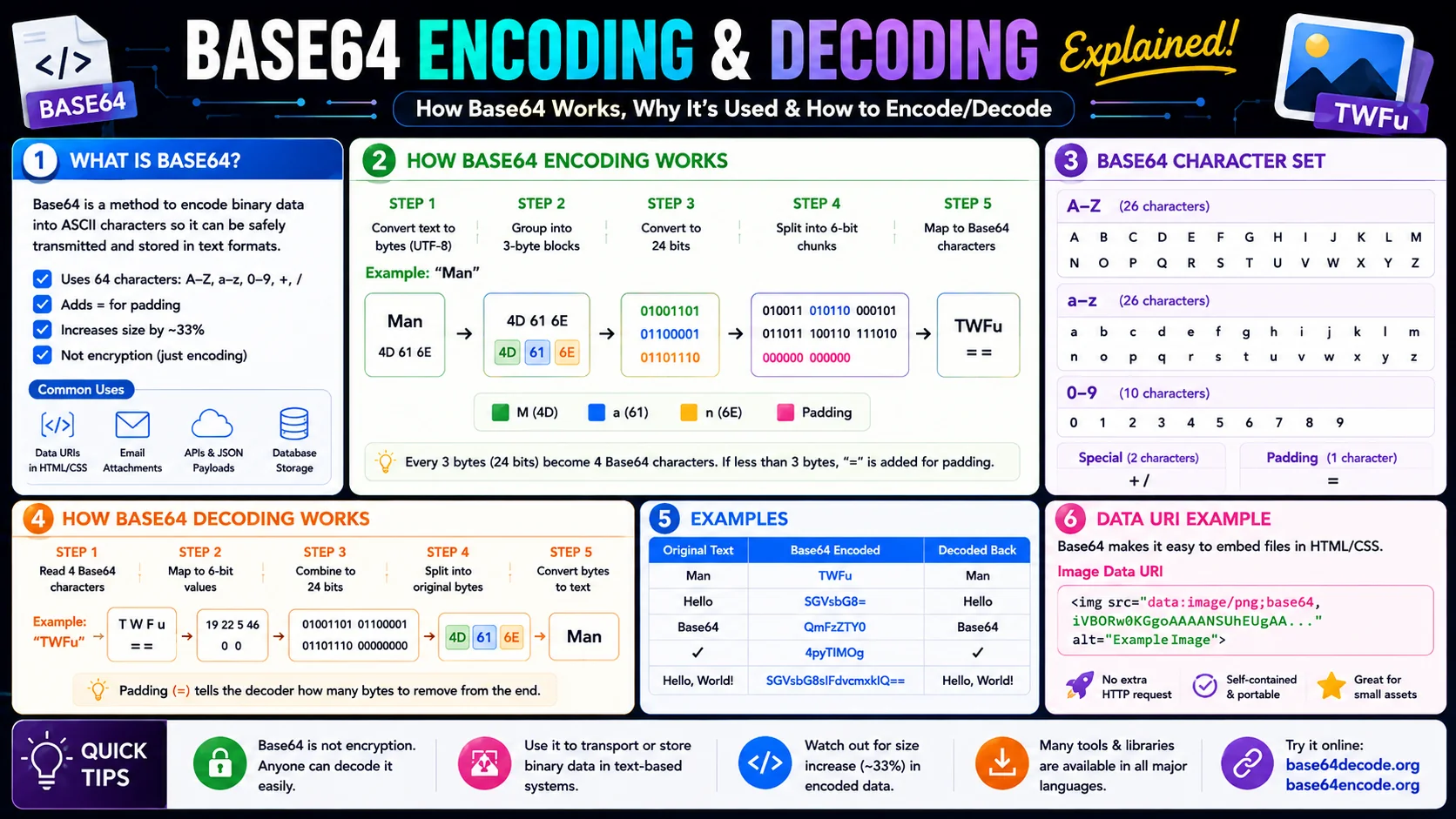
The name "Base64" comes directly from the mathematics of the translation. The algorithm groups raw binary data into blocks of 24 bits. Here is a step-by-step breakdown of how the conversion occurs:
- Group the bits: The encoder takes three 8-bit bytes of binary data (totaling 24 bits) and groups them together.
- Split into 6-bit chunks: The 24 bits are then divided into four separate 6-bit chunks (since 24 ÷ 4 = 6).
- Map to the Index Table: A 6-bit binary number can represent values from 0 to 63. The encoder maps each value to its corresponding ASCII character in the Base64 index table. For example, 0 maps to 'A', 26 maps to 'a', and 62 maps to '+'.
- Handle Padding (=): If the input binary data is not a multiple of three bytes, the encoder adds padding bytes (using the
=character) at the end of the output to ensure the final block is fully formed.
The Math Behind the Encoding
Base64 is rooted in a simple mathematical relationship. Each group of 3 input bytes (24 bits) is converted into 4 output characters (24 bits ÷ 6 bits per char = 4 chars). This is where the 33% size increase comes from:
Worked Example: Encoding "Man"
The classic textbook example shows the algorithm in action. The ASCII text "Man" becomes:
| Step | Value | Notes |
|---|---|---|
| ASCII | M, a, n | Source text |
| 8-bit values | 77, 97, 110 | Decimal byte values |
| Binary | 01001101 01100001 01101110 | 24 bits concatenated |
| 6-bit groups | 010011 010110 000101 101110 | Split into 4 chunks |
| Decimal indices | 19, 22, 5, 46 | Convert each chunk |
| Base64 chars | T, W, F, u | Look up in the index table |
Result: "Man" → "TWFu". This four-character output perfectly illustrates the 3:4 byte-to-character ratio that defines Base64.
Base64 Index Table (Quick Lookup)
Use this reference whenever you need to manually verify or debug a Base64 string. Each row maps a 6-bit value (0–63) to its corresponding ASCII character.
| Index | Char | Index | Char | Index | Char | Index | Char |
|---|---|---|---|---|---|---|---|
| 0 | A | 16 | Q | 32 | g | 48 | w |
| 1 | B | 17 | R | 33 | h | 49 | x |
| 2 | C | 18 | S | 34 | i | 50 | y |
| 3 | D | 19 | T | 35 | j | 51 | z |
| 4 | E | 20 | U | 36 | k | 52 | 0 |
| 5 | F | 21 | V | 37 | l | 53 | 1 |
| 6 | G | 22 | W | 38 | m | 54 | 2 |
| 7 | H | 23 | X | 39 | n | 55 | 3 |
| 8 | I | 24 | Y | 40 | o | 56 | 4 |
| 9 | J | 25 | Z | 41 | p | 57 | 5 |
| 10 | K | 26 | a | 42 | q | 58 | 6 |
| 11 | L | 27 | b | 43 | r | 59 | 7 |
| 12 | M | 28 | c | 44 | s | 60 | 8 |
| 13 | N | 29 | d | 45 | t | 61 | 9 |
| 14 | O | 30 | e | 46 | u | 62 | + |
| 15 | P | 31 | f | 47 | v | 63 | / |
Padding: = is used to round the output up to a multiple of 4 characters (1 or 2 pad chars depending on input length).
Common Web Development Use Cases
Base64 is widely adopted in modern web applications. Here are the most frequent implementations:
- Inline Images (Data URIs): Small decorative icons or graphics can be encoded into Base64 and embedded directly inside HTML or CSS files using
data:image/png;base64,.... This removes the need for browser network requests, speeding up first-paint loading times. - JSON Payloads: JSON is a text-based format. If you need to send a user avatar or a PDF attachment to a REST API, you must encode the file in Base64 so it can fit cleanly inside a JSON string.
- Basic Authentication: Legacy HTTP Basic Auth headers send credentials encoded as Base64 strings (
Authorization: Basic [Base64-string]) to prevent characters like colons from breaking header parsing. - JWT Tokens: JSON Web Tokens encode their header and payload segments in Base64URL so they remain safe to transmit inside HTTP headers and URLs.
- SMTP Email Attachments: The MIME standard (RFC 2045) requires email attachments to be Base64-encoded so binary files survive the trip through 7-bit text-only SMTP servers.
The Pros and Cons of Base64
Before using Base64, developers must weigh its performance impact:
✅ Advantages
Reduces HTTP requests, simplifies data transmission in JSON, guarantees binary integrity across networks, and is supported natively by every modern browser via atob() and btoa().
❌ Disadvantages
Increases data size by approximately 33%, consumes more CPU memory to encode/decode, complicates HTTP caching strategies, and is not human-readable or secure.
Best Practices for Base64
- Keep it small: Limit Base64 to resources under 10 KB. For larger images, traditional file referencing is superior because browsers can cache those files independently and load them asynchronously.
- Use Base64URL for URLs: Switch to
-and_(and drop padding) whenever the value travels inside a URL, query string, or filename. - Never use it for secrets: Base64 is decoded in one line of JavaScript. Hash, encrypt, or sign anything that needs protection.
- Set proper cache headers: Inlined data URIs cannot leverage standard HTTP caching. For frequently changing content, link to a real file URL instead.
Base64 vs Hexadecimal: Two Encoders, Different Goals
Base64 is not the only binary-to-text scheme, and understanding its main rival — hexadecimal — clarifies why Base64 wins for size while hex wins for readability. Hexadecimal represents each byte as two characters from a 16-character alphabet, which results in exactly two hex digits per byte and a clean 1:2 expansion ratio. There are no special symbols, no padding, and every pair of characters maps transparently to one byte, which is why hex is the format of choice for hashes, memory addresses, and raw byte dumps.
Base64, by contrast, packs six bits per character into a 64-character alphabet, producing four characters per three bytes — a 1:4/3 ratio that is 33% overhead versus hex’s 100% overhead. For anything larger than a handful of bytes, Base64 is meaningfully smaller, which is why it dominates in transport contexts like email attachments and data URIs. The trade-off is legibility: Base64 strings are opaque to the eye, so the two encoders serve different moments — hex when humans are reading the bytes, Base64 when the bytes are being shipped.
Reading a Base64 String by Eye
You cannot decode Base64 mentally the way a developer can read hex, but a few structural cues let you extract useful information from a string without running a decoder:
- Length. Because output is always a multiple of four, a well-formed Base64 string’s length is divisible by four, with padding
=rounding it up. - Padding signs. One
=means the last chunk held two bytes; two=signs mean it held one. No padding means the original length was a clean multiple of three. - Alphabet. If you see
+and/, it is standard Base64; if you see-and_with no padding, it is the URL-safe variant used in JWTs. - Known prefixes. A string starting
iVBORis a PNG; one starting/9j/is a JPEG;R0lGODbegins a GIF. These magic-byte prefixes tell you the file type before you decode a single byte.
The Padding Conundrum and Why It Exists
The = padding at the end of many Base64 strings is one of the most-questioned details of the format. It exists for a straightforward reason: the encoder works in groups of three bytes producing four characters, and when the input length is not divisible by three, the encoder signals the shortfall by appending one or two padding characters so the decoder knows how many bytes the final group really contained.
Padding is not always required, which is why the URL-safe Base64URL variant often drops it entirely — an = in a query string would have to be percent-encoded, so removing it keeps the value clean for URLs. The decoder can reconstruct the length from context even without padding, which is why many modern implementations accept unpadded input. In practice, the padding flag matters mainly when you switch between strict and lenient parsers: a strict parser rejects a message a lenient one accepts, and the difference is almost always the padding.
Frequently Asked Questions
Is Base64 encryption?
Why does Base64 increase file size by about 33%?
Can Base64 handle images and PDFs?
What is the difference between Base64 and Base64URL?
Is Base64 safe to use in URLs?
What is the maximum data size for Base64?
Need to convert data to Base64 instantly?
Use our free Base64 Converter tool to encode plain text, decode existing hashes, or handle files locally inside your browser.
Launch Base64 Converter →