How to Check Your Writing for Grammar Errors
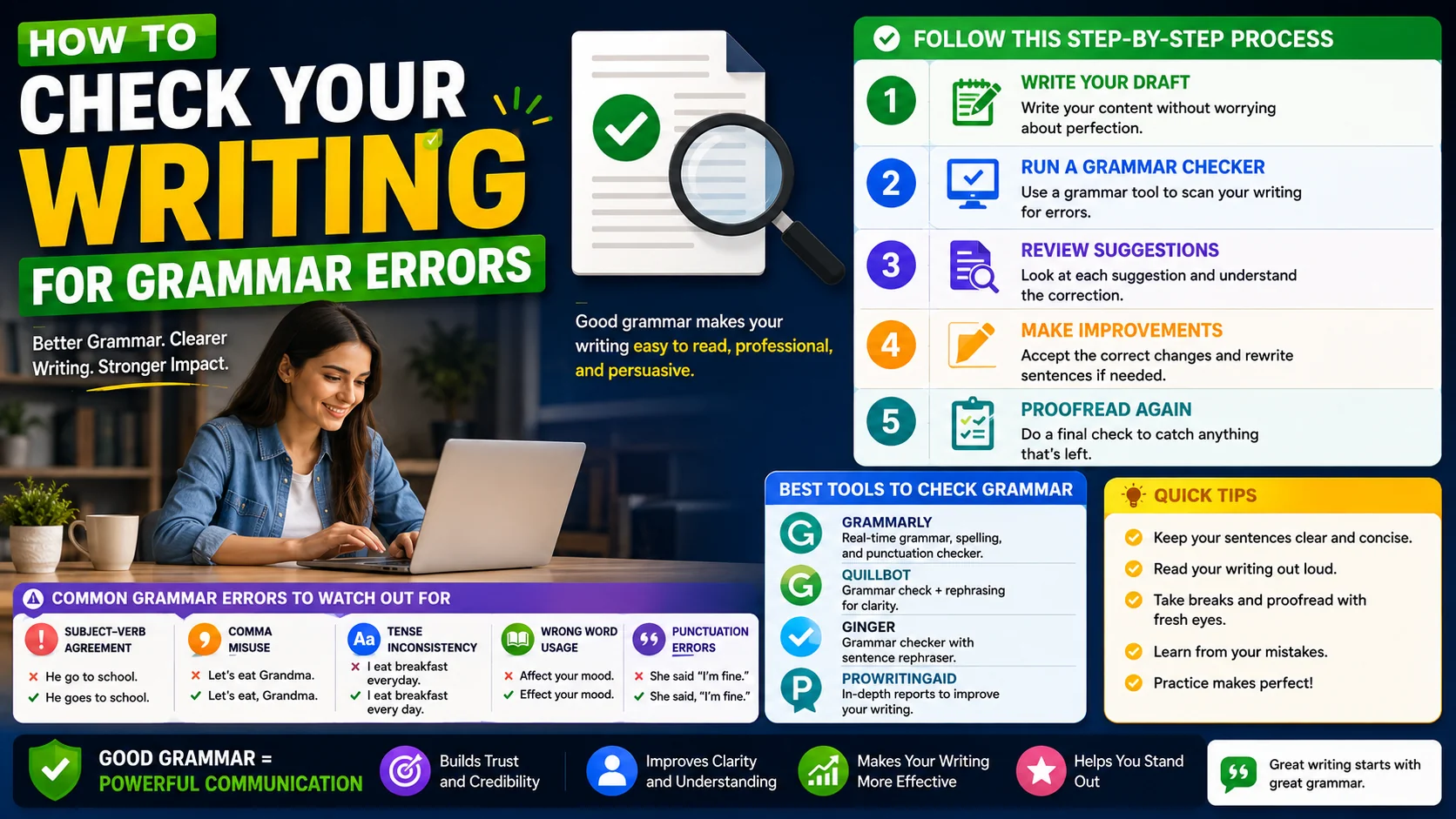
Good grammar is not pedantry — it is clarity. A misplaced comma or the wrong homophone can change a sentence’s meaning, slow the reader down, or quietly erode their confidence in the writer. This guide walks through the most common errors, how to use an automated grammar checker well, and the proofreading habits that catch what tools miss.
Why Grammar Still Matters
Even experienced writers make grammar mistakes. Fatigue, haste, and the sheer cognitive load of forming ideas mean slips creep in no matter how careful you are. The cost of those slips is rarely a single misread sentence — it is the cumulative impression of carelessness that readers build up over a whole document.
Grammar matters most when the stakes are highest: a job application, a customer email, a published article, a legal contract. In each case the reader is forming a judgement about you, and avoidable errors work against you without your knowing. The good news is that most errors fall into a small, learnable set of patterns, and modern tools catch the majority of them automatically.
The Most Common Grammar Mistakes
These are the errors that appear again and again, across genres and experience levels. Most come down to homophones, agreement, or punctuation:
- Your vs You’re: “Your” shows possession, “you’re” means “you are”. The confusion is purely auditory — they sound identical, so the wrong one slips past untouched.
- There / Their / They’re: “There” indicates place, “their” shows possession, “they’re” means “they are”. All three slip into the wrong slot when writing quickly.
- Its vs It’s: “Its” is possessive (no apostrophe), “it’s” means “it is”. This one trips people up because the apostrophe usually signals possession — but not for pronouns.
- Subject–verb agreement: Singular subjects need singular verbs, and vice versa. Errors usually appear when other words separate the subject from the verb, like “The list of items are on the desk” (should be “is”).
- Comma splices: Joining two independent clauses with only a comma, as in “It was late, we left early.” Use a period, semicolon, or coordinating conjunction with the comma instead.
- Affect vs Effect: “Affect” is usually a verb (“to influence”), “effect” is usually a noun (“the result”). A grammar checker flags almost every misuse of this pair.
Using a Grammar Checker Effectively
The Grammar Checkeruses an AI model to detect and suggest corrections for grammar mistakes, spelling slips, and awkward phrasing in real time. Just paste your text and you get instant, in-line suggestions — but using the tool well is more than clicking “accept all”.
Best practices for getting real value out of a checker:
- Review each suggestion carefully. Not every automated correction is right. Read the sentence with the proposed change before accepting it, and trust your judgement over the tool’s when they conflict.
- Understand why a change is suggested. A good checker usually offers a short explanation. Internalising the rule prevents the same error next time and sharpens your editing instincts.
- Use the tool as a learning aid, not just a fixer. Track which errors come up often for you — those are your blind spots and the place where a small amount of focused study pays off.
- Run a final pass after editing. Reorganising paragraphs can introduce new errors. A final checker pass after your structural edits catches the fallout.
- Don’t outsource your voice. A checker may “correct” a deliberate fragment or casual tone. Preserve your style by rejecting suggestions that flatten your intended voice.
Proofreading Techniques That Work
Beyond automated tools, develop your own proofreading skills. No checker catches everything, and a human reader still notices things tools miss — unclear logic, missing context, tone shifts. These techniques make a real difference:
- Read your writing aloud. Your ear catches awkward phrasing that your eye glides over. If you stumble when reading it, your reader will too.
- Take a break between writing and proofreading. Even ten minutes of distance changes how the text looks. Ideally, sleep on it for important pieces.
- Read backwards. Reading sentences in reverse order forces you to focus on individual words rather than flowing past errors in context.
- Print it out. Errors are often easier to spot on paper than on screen, partly because the change of medium disrupts your familiarity with the text.
- Change the font or size. Even a temporary visual jolt makes mistakes more visible by making the text feel unfamiliar again.
Building a Long-Term Writing Habit
The goal is not to become a perfect grammarian but to write credibly and clearly with less effort over time. Combine the tools and techniques above with two long-term habits and your writing will quietly improve without you noticing.
First, read widely. Exposure to well-edited prose — books, long-form articles, professionally edited content — trains an instinct for correctness that no tool can fully replicate. Your brain absorbs patterns the way a music student absorbs rhythm. Second, keep a personal error log. When a checker flags something you did not realise was wrong, note it. Revisiting that list once a month powers through your blind spots faster than any course would.
The Error Categories Most Writers Miss
Beyond the headline homophones, a small set of subtler problems accounts for most of the writing that feels “off” even after a spell-check comes back clean:
- Dangling modifiers. The phrase “walking into the room, the lights flickered” technically makes the lights the walker. Reattach the modifier to its real subject.
- Vague pronoun reference. When “this” or “it” points at four possible antecedents, the reader has to guess. Name the thing instead.
- Inconsistent parallel structure. A list that mixes “reading, to write, and editing” breaks its own rhythm; keep the grammatical form consistent across all items.
- Shifts in tense or person. Drifting from “you” to “one” or from past to present within a paragraph reads as carelessness even when nothing is technically wrong.
- Wordiness. “Due to the fact that” where “because” will do is the classic sign of a sentence that has not been edited, only typed.
When to Trust the Tool — and When to Overrule It
An automated checker is a strong first reader and a weak final authority. It will reliably flag mechanical slip-ups — the missing verb, the mismatched subject, the comma splice — but language is dense with legitimate exceptions, and the tool cannot always see your intent. A correctly used idiom may be flagged as an error, a fragment that serves your rhythm may be “corrected” into a flatter sentence, and technical jargon may be marked as a misspelling.
The right mental model is a negotiated edit rather than an “accept all” pass. Read each suggestion, weigh it against what you actually meant, and overrule freely. The tool is most trustworthy on the mechanical categories and least trustworthy on style, tone, and voice — so lean on it for grammar and keep your own judgement for the rest. When a suggestion and your intent conflict, your intent wins.
A Shadow-Editing Workflow for Long Documents
- Pass one: structure. Check the argument holds up before fixing commas — reorganise, cut, and tighten while the logic is the only thing on the table.
- Pass two: automated sweep. Run the grammar checker across the whole document to clear mechanical errors and collect a list of its suggestions.
- Pass three: read aloud. Your ear catches rhythm problems and over-long sentences that the tool will not flag.
- Pass four: proof on a different medium. A printout or a font change makes the text feel unfamiliar so your eye stops auto-correcting what it expects to see.
- Pass five: final automated check. Re-running the tool after all the edits catches the new errors that the reorganising introduced.
Frequently Asked Questions
Can a grammar checker replace a human proofreader?
Why does my grammar checker sometimes suggest wrong changes?
How is a grammar checker different from a spell checker?
Does good grammar actually matter for email and chat?
How do I improve my grammar long-term?
Check your writing in seconds
Paste your draft into our free Grammar Checker to catch typos, agreement problems, and awkward phrasing instantly — with explanations for every suggestion.
Open the Grammar Checker →