Base64 Image Converter Guide: Encode, Decode & Data URIs Explained
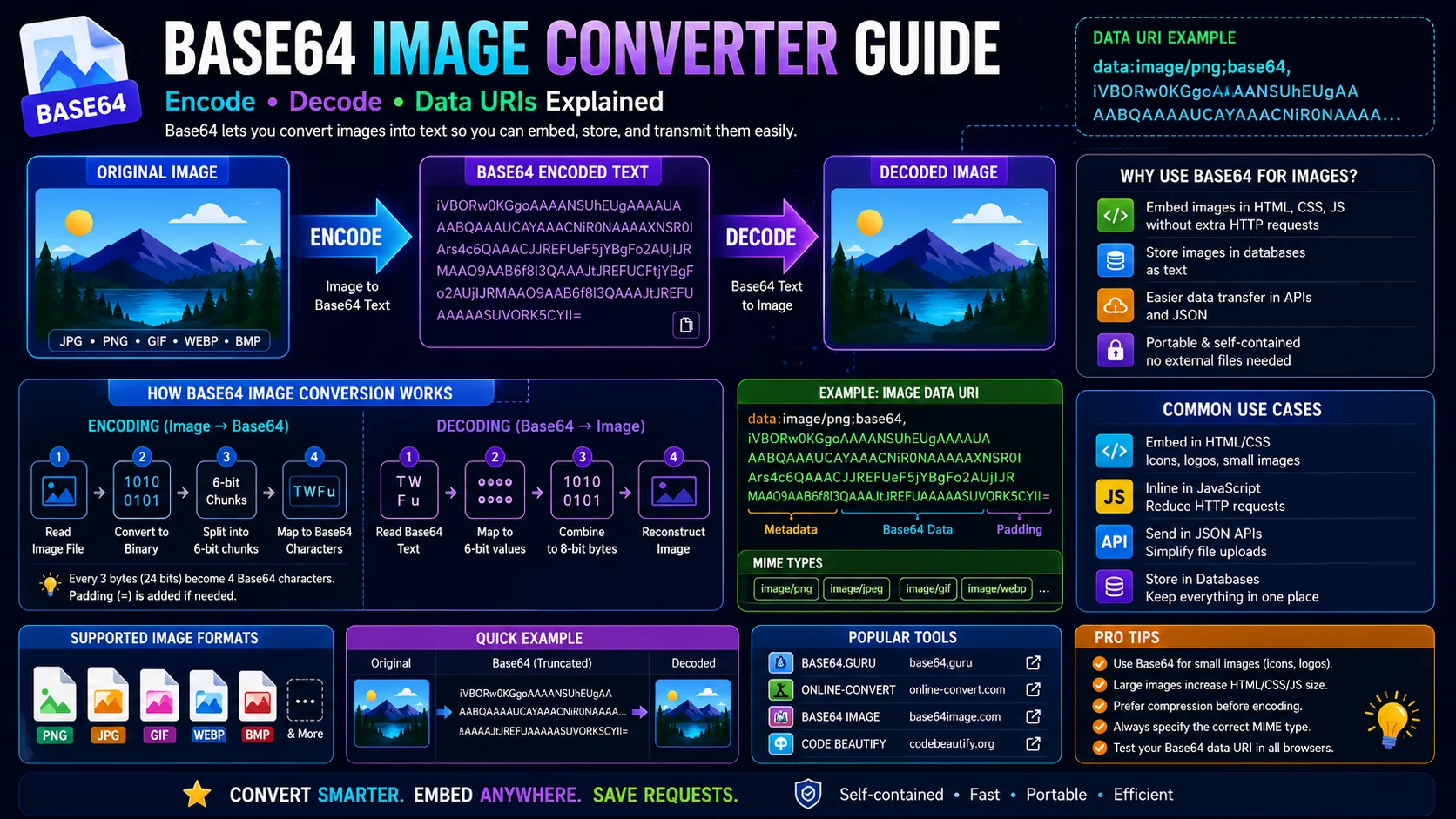
Base64 is an ancient web technique that refuses to die because it solves a real problem: turning binary image bytes into portable text that lives inside HTML, CSS, JSON, and email without a separate network request. This guide explains how the encoding works, the difference between a Data URI and a raw Base64 string, when to inline images and when to stick with URLs, and why the converter should run in your browser.
Why Base64 Image Encoding Still Matters
Before HTTP/2 made multiple requests cheap, embedding a tiny image as a Base64 Data URI inside HTML or CSS saved a round trip and an extra connection. Even today, that pattern remains useful: inline favicons, email-embedded logos, React component placeholders, JSON API payloads, and offline-first web apps all rely on Base64 to keep critical assets bundled with their content.
The cost is roughly a 33% size inflation versus the original binary, so Base64 is best reserved for assets under about 4 KB where eliminating a network request wins back more than the extra bytes. For everything larger, a CDN-served image with proper caching headers remains faster overall.
How Base64 Encoding Actually Works
Base64 takes raw binary data — every byte of a JPG or PNG file — and represents it using only safe ASCII characters from a 64-character alphabet: A–Z, a–z, 0–9, +, and /. The encoder reads three bytes at a time (24 bits), splits them into four 6-bit groups, and maps each group to one of the 64 alphabet characters. The output is padded with = signs when the input length is not divisible by three.
The reverse process is identical in spirit: the decoder reads four Base64 characters, converts each back to its 6-bit value, joins them into 24 bits, and writes out the original three bytes. Because the encoding is lossless and deterministic, decoding any valid Base64 string always recovers exactly the original bytes — nothing is approximated or compressed.
Data URI vs Plain Base64
Data URI
Bundles the MIME type and the encoding hint into the payload:
data:image/png;base64,iVBORw0KGgoRequired by browsers, CSS engines, and email clients, which need the MIME type to interpret the bytes.
Plain Base64
Just the encoded characters, no prefix:
iVBORw0KGgoAAAANSUhEUg...More compact; the standard interchange format for database columns, JSON API fields, and any context where the consuming code already knows the format.
When to Inline and When to Use a URL
- Inline CSS backgrounds for repeating patterns, gradients, or tiny SVG icons embedded inside CSS rules — saves a request and keeps the stylesheet self-contained.
- Email signatures where remote images are blocked by default — a Base64 logo renders inline without triggering image proxies.
- React/Vue single-file components that bundle their assets for portability across SSR, Storybook, and code-sandbox demos.
- JSON API payloads for thumbnail fields where the consumer does not want a separate HTTP request.
- PWA service workers that cache small icons and tile patterns inline for instant first paint.
For anything larger than a few kilobytes, prefer a regular image URL. Inline Base64 does not get its own cache entry — every page load re-downloads the entire HTML payload with the encoded image baked in, even across a hundred visits. A 200 KB hero image inlined as Base64 adds 67 KB of encoded text to every single page load, easily a 30% bandwidth penalty versus a properly cached external asset. URLs are also cacheable, resizeable, lazy-loadable, and negotiable to modern formats like AVIF or WebP — none of which work with embedded Data URIs.
Privacy and the Local Pipeline
Because Base64 strings are just text, they pass through every logging pipeline, copy-paste buffer, and chat transcript alongside the rest of your code. Treat any Data URI that contains sensitive content — private screenshots, user-uploaded documents, internal mockups — with the same care you would give the original binary file. Long-term storage in version control is generally fine, but never paste sensitive Base64 into public chats or unencrypted emails.
Privacy: 100% client-side
A browser-based converter runs the entire encode and decode pipeline locally — the built-in FileReader and btoa/atob APIs handle files in device memory and never transmit anything over the network. Decoded output blobs exist only as object URLs scoped to the current tab session. For sensitive images, this is the only safe design.
The 33% Tax, Explained and Mitigated
The most-cited drawback of Base64 is the size penalty. Because every three bytes of binary become four characters of text, an encoded file is always about one-third larger than the original — and that is before you consider that the encoded string must then be parsed and decoded back on the other end. For a 100 KB image, that is an extra ~33 KB plus the CPU cost of the round trip.
Where the penalty is acceptable, it buys something in return — fewer HTTP requests, portability through text-only channels, or the ability to embed a file directly in a single source-of-truth document. The mitigation is simply discipline about scale: inline the tiny assets where the round-trip savings dominate, and keep a regular URL for everything else. A favicon inlined as Base64 is a win; a 2 MB photograph is a liability.
Encoding Multiple Images in One Pass
A converter that can only handle one image at a time becomes tedious the moment you need to prepare a batch of inline icons or a set of embedded thumbnails. The better workflow is multi-file: drop in several images, and the tool produces a corresponding Data URI (or raw Base64 string) for each, ready to paste or export together.
This matters most when building a component library or an email template, where a handful of small assets are usually embedded as a set. Keeping them consistent — same MIME prefix, same encoding, same quoting — avoids the copy-paste errors that creep in when you hand-build each Data URI individually. Batch encoding turns a fifteen-minute formatting chore into a single drag-and-drop.
Debugging a Broken Base64 Image
When an embedded image fails to render, the cause is almost always one of four things, and they are quick to isolate:
- Missing MIME type. A plain Base64 string pasted where a Data URI is expected has no type hint, so the browser cannot interpret the bytes. Add the
data:image/<type>;base64,prefix. - Stray whitespace or line breaks. Some editors wrap long strings with newlines; those become invalid characters. Strip whitespace or use a converter that reassembles the string correctly.
- Truncation. A copy-paste that cut off the end of a very long string yields a corrupted chunk. Re-copy the full payload.
- Wrong encoding flag. A payload that was URL-encoded or percent-encoded rather than Base64 will not decode as an image.
Running the string back through a decoder is the fastest test: if the tool re-renders the image, the payload is sound and the problem is in how it is being used; if it fails, the payload itself is the issue.
Frequently Asked Questions
What does Base64 image encoding actually do?
What is the difference between a Data URI and plain Base64?
Can I decode any Base64 string back into an image?
How big can a Base64 image string get?
Is my image uploaded to a server during encoding or decoding?
When should I prefer Base64 over a regular image URL?
Encode and decode Base64 images in your browser
The ToolWise Base64 Image Converter encodes up to 20 images at once to Data URI or raw Base64, decodes any string back to a downloadable image, and runs entirely client-side — nothing is uploaded, nothing is logged.
Open Base64 Image Converter →