QR Code Generator Guide: Static Codes, Error Correction & Print
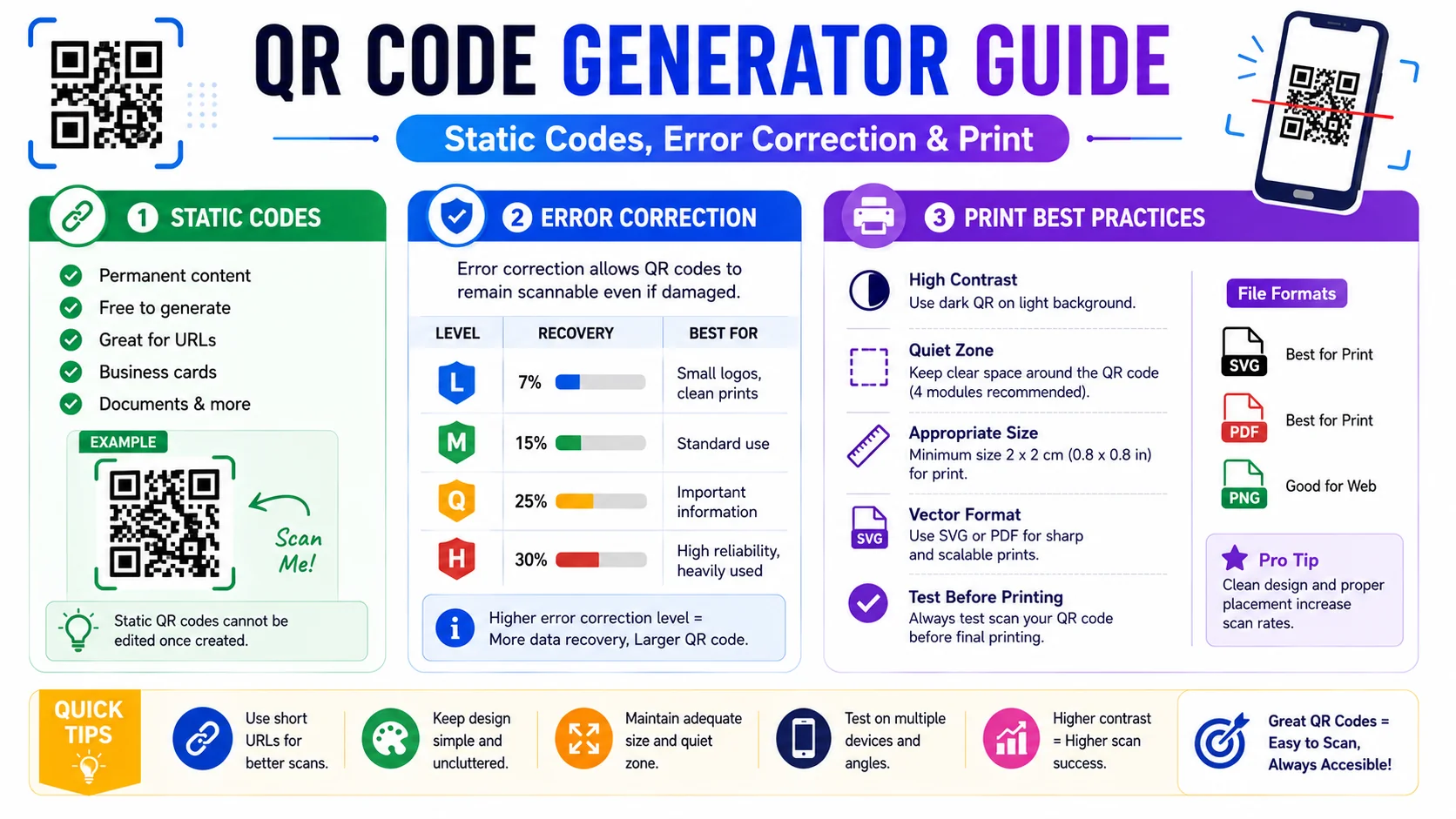
A QR code looks like a square of noise, but it is a precisely engineered two-dimensional barcode that survives scratches, prints, and camera shake. This guide covers how the matrix encodes data, why static codes never expire, how error correction lets you embed a logo, and the design rules that keep your codes scannable in the real world.
How QR Codes Encode Data
A traditional one-dimensional barcode stores data only horizontally, which caps its capacity at a dozen or so characters. A Quick Response (QR) code is two-dimensional: it stores data both horizontally and vertically in a grid of black and white modules. That matrix structure lets a single code hold hundreds of times more information than a linear barcode — up to roughly 7,000 numeric digits at the largest version.
When a phone camera reads a QR code, the software first locates the three large positioning squares in the corners to learn the code's orientation and scale. Smaller alignment patterns help the decoder correct for perspective distortion, and a timing pattern of alternating modules lets it count the grid size. The software then walks the dot matrix, reads the binary payload, runs it through the error-correction layer, and decodes the original string — a URL, an email command, a vCard, or plain text.
Static vs Dynamic QR Codes
Before you print anything, understand the difference — it determines whether you can change the destination later.
- Static QR codes encode the real destination directly into the matrix. The code is a permanent, self-contained image with no external dependency, so it never expires and works offline. The trade-off: if the destination changes, you have to regenerate and reprint the code.
- Dynamic QR codes encode a short redirect link — usually a vendor-owned URL like
q.io/abc123— that forwards to the real destination. You can change the target at any time without reprinting, and the vendor can track scans. The cost is a paid subscription and a hard dependency on the vendor's servers: if they shut down, every code stops working.
Static is the right default for permanent assets.
ToolWise generates 100% static codes — no subscription, no tracking, no expiry. Choose dynamic only when you need analytics or the ability to change the destination post-print, and pick a vendor whose longevity you trust.
Error Correction and Center Logos
Every QR code carries a layer of Reed-Solomon error correction — the same family of algorithms used on CDs and in RAID storage. The encoder deliberately duplicates data throughout the matrix so that, even if a portion of the code is damaged or obscured, the decoder can reconstruct the missing bytes from the redundant copies elsewhere.
QR codes offer four error-correction levels:
| Level | Recovery capacity | Typical use |
|---|---|---|
| L | ~7% of data | Maximum data capacity, clean environments |
| M | ~15% of data | Default for most generators |
| Q | ~25% of data | Outdoor or printed codes |
| H | ~30% of data | Center logo, harsh environments |
The logo trick exploits this redundancy directly: a logo placed in the center “damages” up to about 30% of the modules, but at level H the decoder recovers the data from the surrounding dots. This is why a branded QR code with a logo in the middle still scans — the logo is not breaking the code, it is being absorbed by the error-correction budget.
Five QR Content Types (URL, Text, Email, SMS, vCard)
A QR code is just encoded text, but phones recognize several standard “schemes” and act on them:
- URL — begins with
http://orhttps://; the camera opens the browser to that page. The default for marketing links. - Plain text — any free-form string; the phone displays it for the user to copy. Useful for Wi-Fi passwords, verification codes, or short notes.
- Email —
mailto:scheme with optional subject and body; scanning opens a pre-filled email draft. Great for support desks and event RSVPs. - SMS —
sms:scheme with optional pre-filled body; scanning opens the messaging app. Useful for short surveys or contests. - vCard — encodes a contact record in the
BEGIN:VCARDformat with name, phone, email, organization, and website; scanning offers to save the contact straight to the address book. The right choice for business cards.
Design and Print Best Practices
- Maintain high contrast. Dark dots on a light background. Pale yellow on white, or light gray dots, regularly fail to scan. Pure black on pure white is the safest choice; colored codes are fine only if the foreground is dark and saturated.
- Leave a quiet zone. QR codes need a clear margin of background color around all four edges — the “quiet zone” — so the camera can isolate the code from surrounding artwork. Crop posters and packaging with this margin in mind.
- Test on multiple devices before printing. Scan a printed mock-up with a modern phone, an older phone, and a dedicated barcode app. Ink spread on paper can merge adjacent dots at small sizes; what looks crisp on screen can blur in print.
- Match resolution to physical size. A 250px download is fine for a business card; a poster needs 1000px or higher so the dots stay crisp when enlarged. Print the code at least 1 inch across for arm's-length scanning.
- Double-check the destination. A static code cannot be edited after printing. Verify the URL works, has no typos, and resolves to the right page before you commit it to thousands of flyers.
Sizing and Resolution for Print vs Screen
A QR code that scans perfectly on a screen can fail on paper, because the two media demand different things from the same dots. On a screen the code is backlit, sharp, and usually displayed large; in print it is ink on paper, subject to dot gain, and often squeezed to fit a small corner of a business card or flyer. The result is that the same download that scanned instantly on your monitor may blur at the actual printed size.
The reliable rules are: match resolution to physical size (a few hundred pixels is enough for a card, a thousand or more for a poster), print the code at least one inch across for comfortable arm’s-length scanning, and always test a printed mock-up — not a screen preview — before committing to a run. Ink spread can merge adjacent modules at small sizes, which is precisely the damage a printed code invites and a screen preview hides.
Customising Style Without Breaking the Code
Modern generators let you recolor the dots, round the corners, and drop a logo in the centre — but every aesthetic choice draws down the code’s error-correction budget, and there is a line past which a stylish code stops being scannable. The design window opens only because the code is intentionally over-engineered to survive damage; consume too much of that redundancy with styling and there is none left for the real-world imperfections the code was built to survive.
- Keep foreground darker than background. Dark dots on a light field — never light-on-light, never a pastel that fades into the page.
- Preserve the quiet zone. Four modules of clear margin on every side, or the scanner cannot isolate the code from surrounding artwork.
- Cap the logo. A centred logo should stay under about 30% of the code area and sit on a quiet, high-contrast backing.
- Test after customising. Scan the styled result on two or three devices before it ships; a code no camera can read is worse than a plain one.
Choosing a Download Format That Survives Resizing
QR codes get resized constantly — pulled into design software, scaled for a poster, dropped into a document — and the format you export determines how well they survive that journey. A raster PNG downloaded at its final intended size is the most foolproof for screens and online use. For print shops, a vector (SVG) export is the best case-all: it scales to any physical dimension without ever losing edge crispness, because it stores the code as geometry rather than pixels.
The mistake to avoid is exporting a raster at too low a resolution and then enlarging it later — the modules smear, and the scanner fails. If you have any doubt about how large the code will need to be, choose vector or download the largest raster size available. Sharp edges are everything to a QR decoder, and a crisp vector stays sharp at the size of a postage stamp and the size of a billboard alike.
Frequently Asked Questions
Do QR codes generated by a static generator ever expire?
Will my QR code still scan with a logo in the center?
What size should I download for printing?
Can I use any colors I want?
What is the difference between a URL QR code and a vCard QR code?
How much data can a QR code hold?
Generate a custom QR code in seconds
The ToolWise QR Code Generator makes static codes for URLs, text, email, SMS, and vCards — with custom colors, dot styles, a center logo, and three download sizes. No signup, no subscription, no expiry.
Open QR Code Generator →