Password Strength Checker Guide: Entropy, Cracking Time & Honest Meters
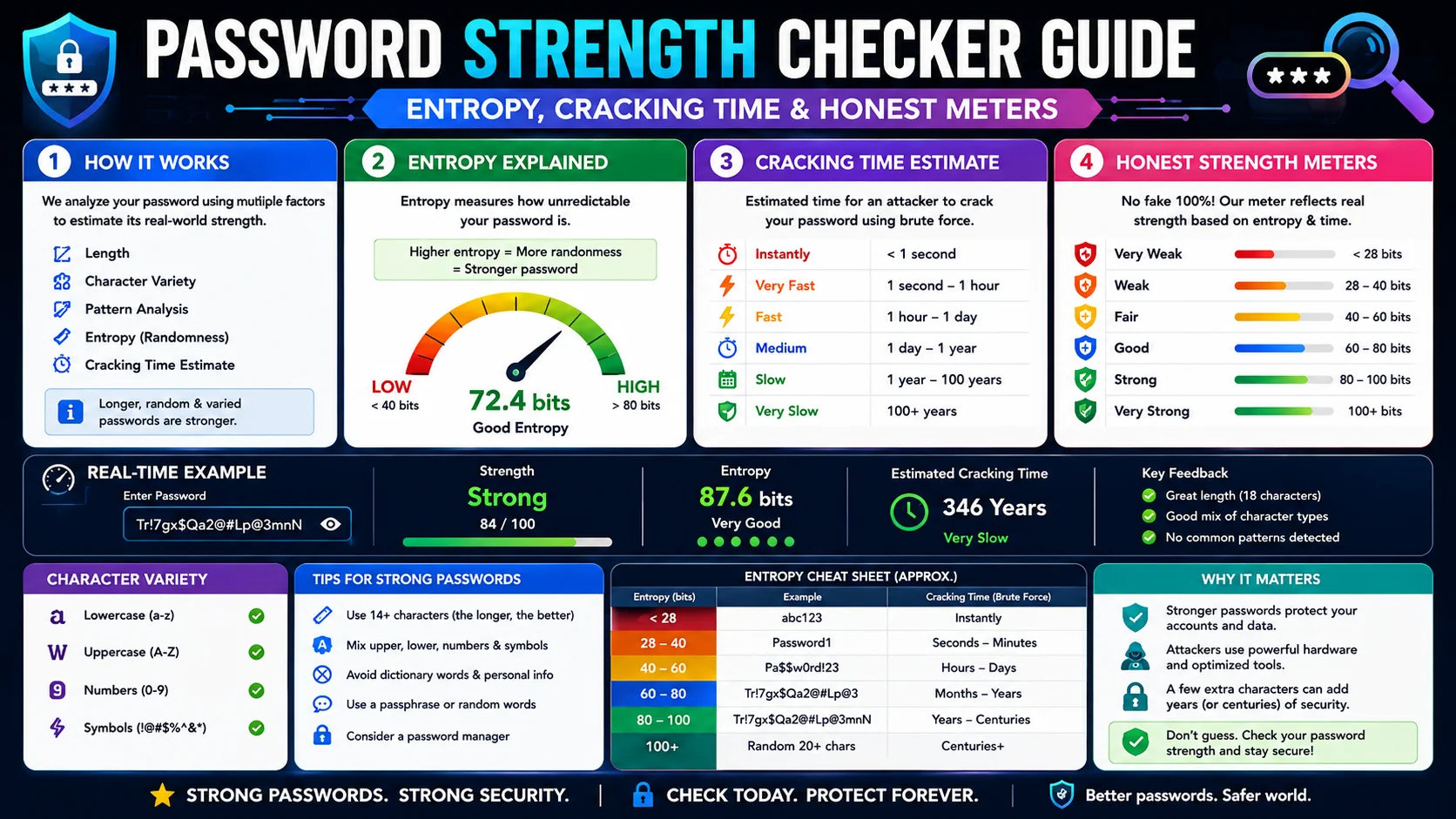
A password strength checker is the tool you reach for the moment a website rejects your password as “too weak”, or the moment before you commit to a password you intend to type for years. The honest question — is this password actually strong, or does it just look strong?— turns out to be subtler than the “8+ characters with one capital” rules on most signup forms imply.
Why a Checker Is Different from a Generator
A password generator creates new random passwords; a strength checker evaluates passwords you already have. The two tools are complementary. The generator is the right answer when you do not yet have a password and need a strong one in seconds. The checker is the right answer when you have a password you are considering — one you just made up, one a workplace assigns, one a relative suggests, or one you have been reusing for too long and want to audit before the next breach.
The checker tells you whether to keep what you have or replace it; the generator gives you the replacement. Use both in sequence: check what you have, replace the weak ones with freshly generated strong ones, store them in a password manager, and you have covered the full password-hygiene workflow.
The Three Classes of Attack
- Online attack with rate limits.The attacker tries passwords against the live login and is throttled to a handful per second, blocked after several failures. A 6-character password survives here simply because the server’s rate limiter stops the attack. This only works when the password is novel to the targeted account.
- Offline attack against a stolen hash. The attacker exfiltrates the password hash from a breach and runs unlimited-rate attacks against it on their own hardware. Here, the only thing standing between the password and recovery is its entropy; rate limits are gone. This is the threat model a serious checker designs against.
- Dictionary attack with common-password lists. A sub-case of the offline attack where the attacker feeds cumulative breach lists (rockyou and descendants). Passwords in the dictionary fall in seconds, regardless of their surface complexity. Entropy calculations on dictionary-listed passwords are a polite fiction — the password is already gone.
The takeaway: any password protecting an account that has been or could be breached in a database leak must resist offline attack, and the only thing resisting offline attack is entropy minus any dictionary-membership penalty. This is the threat model a real checker uses for its estimates.
How Entropy Becomes Cracking Time
Entropy is the log-base-2 of the search space — the pool size raised to the password length. A 12-character password drawn from the full 94-symbol keyboard has roughly 78 bits of entropy; the same length from 26 lowercase letters has only about 56. Each bit doubles the search space, which is why length is so powerful.
A checker converts entropy into an estimated cracking time using approximations of modern throughput: a single high-end GPU (~10^10 guesses/sec) and a server farm (~10^12 guesses/sec). The estimates are deliberately conservative — they take the upper end of realistic attack capacity — so when the checker says “cracked in 4 hours”, the truth is somewhere between “in 4 hours on a single GPU” and “already compromised by anyone with a dictionary.”
The relative comparison is the useful output: this password will last years, that one will last seconds. The absolute number is a rough scale, not a promise.
The Improvement Suggestions, Ranked
When the checker grades a password as weak, it offers specific suggestions. Order matters — the high-leverage changes come first.
- Add length first. Length is the highest-leverage variable. Going from 8 to 12 random mixed-class characters roughly triples the entropy; going to 16 makes offline cracking practically infeasible.
- Replace common-pattern passwords entirely.
Password123is in every dictionary; no amount of added characters makes it safe. Replace, do not extend. - Include symbols when you can type them reliably. Symbols roughly double the effective pool. But if you will need to type the password on a foreign keyboard where symbols are awkward, prefer length over symbols.
- Avoid keyboard walks.
qwerty,asdfgh,1qaz2wsxare in common-password dictionaries. - Avoid dates and names. Birthdates and family names are the first attack dictionaries tried.
An honest meter grades the current password, suggests changes that genuinely increase entropy rather than only the surface complexity, and refuses to reward password patterns that score well and crack in milliseconds. Where the password is in a common-password dictionary, an honest checker tells you so plainly rather than papering the problem with a green checkmark.
Why a Checker Belongs in Your Browser
The privacy case for a browser-based password checker is unusually strong: the password you are checking is a real password. Submitting it to a remote service means the service has it, regardless of any promises about telemetry or retention.
Privacy: 100% client-side
A browser-based checker runs the entropy calculator, the common-password dictionary lookup, and the suggestion engine entirely inside your tab. The dictionary is copied locally. There is no upload, no telemetry, no third party, no log. The password you check stays on the machine you typed it on — the only acceptable design for this category of tool.
Why a Real Meter Beats a Theatrical One
The password-strength meters on most signup forms are theatrical: they reward capital letters, digits, and special characters, flash a reassuring green the instant you tick the boxes, and grade “P@ssw0rd1!” as strong even though it sits in every breach dictionary. That kind of meter optimises for the appearance of security rather than security itself and lulls people into keeping passwords an attacker will crack in milliseconds.
An honest meter works backwards from the attack. It consults a common-password dictionary first, because a listed password is already compromised whatever its surface complexity; it computes entropy from the real character pool and length rather than from checkboxes; and it reports a cracking-time estimate that assumes an offline attacker with modern hardware, not a polite signup form. The difference is stark on the edge cases — the honest meter says “cracked instantly” for the dictionary password and “centuries” for the random one, where the theatrical meter says “strong” for both. If you want to know whether a password is actually safe, use a meter that can tell the difference.
Reading the Cracking-Time Estimate Correctly
A cracking-time number like “4 hours” or “800 years” is the most useful output a checker produces, but it is easy to misread. The estimate is built on assumptions — an attack speed of ten billion guesses per second, the password not being in a dictionary, a clean offline hash — and the truth sits somewhere below the headline figure. The estimate is a comparison, not a guarantee.
| Reported time | What it actually tells you |
|---|---|
| Instantly / seconds | In a dictionary or trivially short; replace it now. |
| Hours to days | Not safe against a determined offline attacker. |
| Months to years | Adequate for most consumer accounts with 2FA. |
| Centuries+ | Effectively uncrackable by brute force; the remaining risk is the password being leaked or phished, not guessed. |
The correct read is relative: this password outlasts that one by orders of magnitude. Use the estimate to rank options and to spot the passwords that are already gone, and pair the strong result with two-factor authentication so that even a correct-but-leaked password cannot be used alone.
Auditing Passwords You Already Use
- List the accounts that matter. Start with email, banking, and anything that can reset other accounts — the recovery paths are the crown jewels.
- Check each once. Run each existing password through the checker, and note whether it reports a dictionary hit or a short cracking time.
- Replace the weak ones with a manager-generated unique password rather than a hand-tweaked version of the old one.
- Enable 2FA on everything that supports it — the second factor is what keeps a leaked password from becoming a takeover.
- Re-audit on evidence, not on a calendar. NIST guidance is to change passwords when you have reason — a breach notice, suspicious activity — rather than on an arbitrary rotation.
Frequently Asked Questions
How is password strength actually measured?
Why does my checker grade P@ssw0rd1! as strong when it is in every dictionary?
What is a good password score to aim for?
Do special characters really matter?
Is it safe to paste a real password into an online checker?
Should I check my passwords regularly?
Check your password honestly, in your browser
The ToolWise Password Strength Checker grades entropy on an 8-segment meter, names the strength band, suggests the highest-leverage improvements, and runs entirely client-side — your password never leaves your device.
Open Password Strength Checker →