Case Conversion Guide: camelCase, snake_case, Title Case & More
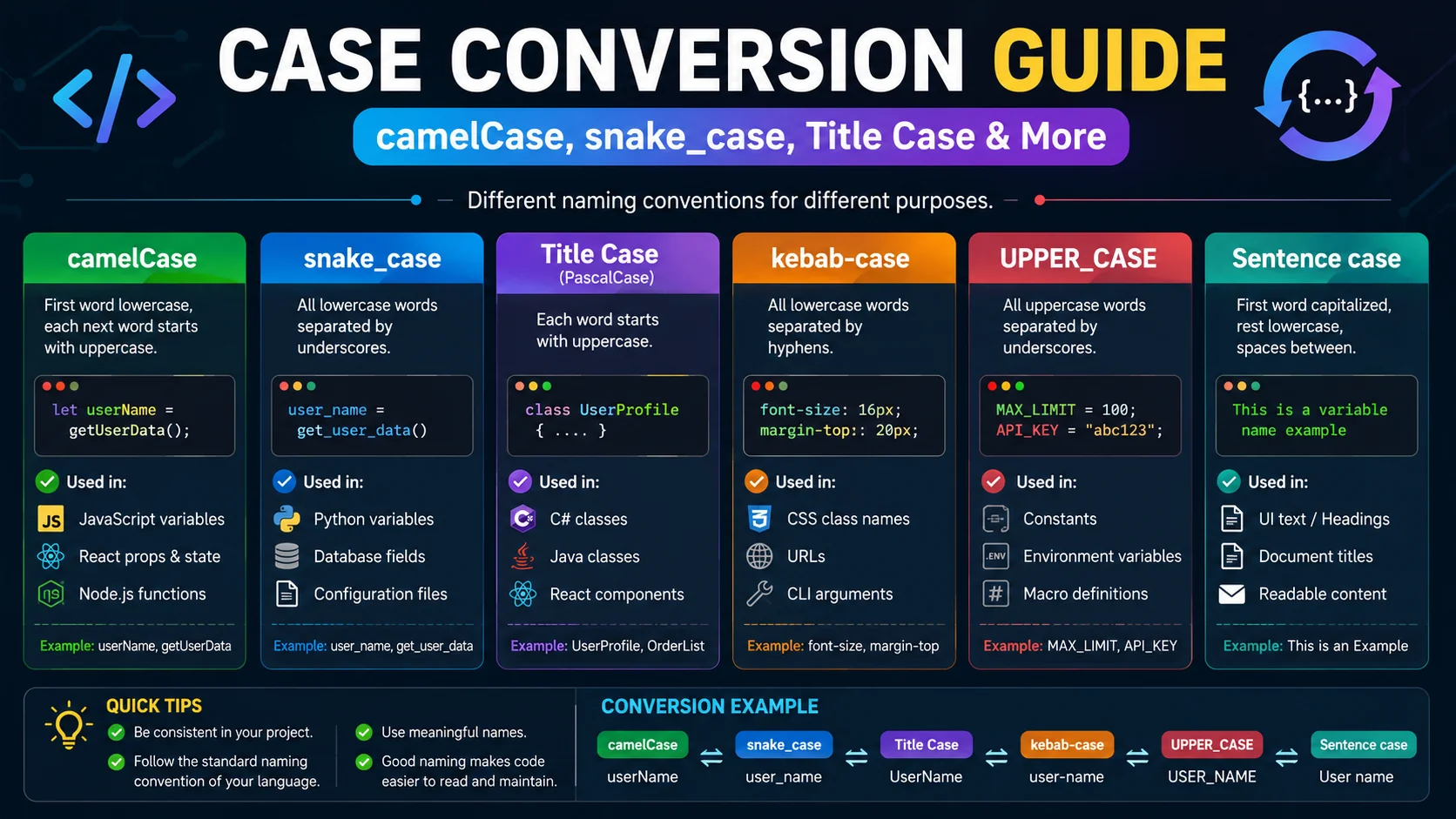
Capitalization looks trivial until you have to reformat 500 database column names by hand or rescue a three-page essay typed with Caps Lock on. This guide explains every common case format — for writers and for programmers — and shows you when to reach for each.
What Case Conversion Actually Does
Case conversion rewrites the capitalization of letters without touching spelling, numbers, or punctuation. Under the hood it is a character-by-character map: each alphabetic character is replaced with its upper- or lower-case counterpart, and everything else passes through unchanged. That is why Order #1234 toggles cleanly between ORDER #1234 and order #1234 — the hash and the digits are inert.
The interesting part is not the per-letter mapping but the segmentation rules that decide which letters to capitalize. Sentence case capitalizes the first letter after a sentence-ending punctuation. Title Case capitalizes the first letter of every word. camelCase joins words and capitalizes every word boundary except the first. Each format encodes a different segmentation rule on top of the same simple upper/lower operation.
Grammar Formats Every Writer Should Know
For prose, four formats cover almost everything you will encounter:
- Sentence case capitalizes only the first letter of each sentence and lowers the rest. It is the natural format for body copy, emails, and most paragraphs. Example:
this is an example.becomesThis is an example. - Title Case capitalizes the first letter of every word. It is the convention for headlines, book titles, and button labels. Example:
the great gatsbybecomesThe Great Gatsby. - UPPER CASE capitalizes every letter. Use it sparingly — for legal headings, warning labels, and short emphasis — because long stretches of capitals are hard to read and read as shouting online.
- lower case removes every capital. Useful for cleaning up messy CSV fields, normalizing search input, or producing casual social-media copy.
Developer Naming Conventions Explained
Programming languages and frameworks enforce strict case conventions for identifiers. Mixing them is not just cosmetic — many compilers, linters, and SQL engines treat my_var and myVar as entirely different symbols.
| Format | Example | Primary Use |
|---|---|---|
| camelCase | userLoginCount | JavaScript, TypeScript, Java variables |
| PascalCase | UserLoginCount | React components, C# classes, TS types |
| snake_case | user_login_count | Python, Ruby, SQL columns |
| kebab-case | user-login-count | URLs, HTML attributes, CSS classes |
| CONSTANT_CASE | MAX_RETRY_ATTEMPTS | Global constants across languages |
The reason each ecosystem picked its convention is consistency with the surrounding tooling: Python’s import system needs underscores because hyphens would be parsed as minus operators; URLs need hyphens because browsers and search engines treat them as word separators. When you switch ecosystems, a converter saves you from retyping dozens of identifiers by hand.
When to Use Each Format (Cheat Sheet)
- Writing an essay or blog post body — Sentence case for the paragraphs, Title Case for the headings.
- Publishing a headline or product button — Title Case (manually lowercase articles and prepositions if you want publication style).
- Naming a JavaScript variable — camelCase for variables and functions, PascalCase for components and constructor functions.
- Naming a Python function or SQL column — snake_case, lowercase.
- Building a URL slug or CSS class — kebab-case, lowercase.
- Declaring a global constant — CONSTANT_CASE across virtually every language.
- Cleaning a chaotic CSV dump — lowercase everything first, then Title Case the display columns you need.
Common Mistakes and Edge Cases
- Apostrophes in Title Case. A naive converter that capitalizes the letter after every apostrophe turns
don'tintoDon'T. A careful converter treats the apostrophe inside a word as a contraction, not a boundary. - Acronyms in camelCase. Converting
XML Parserdirectly to camelCase can producexMLParser. The common convention is to lowercase the whole acronym when it leads a name (xmlParser) and keep it uppercase when it sits mid-name (parseXML). - Hyphens vs underscores as word boundaries. When converting
user-login-countto PascalCase, the hyphens must count as word boundaries so the output isUserLoginCount, notUser-login-countwith a stray hyphen. - Unicode and accented characters. Lowercasing in JavaScript uses
toLowerCase(), which correctly handles accented Latin letters (Á → á) but does not fully normalize every script. For CJK text there is no case to convert.
Beyond the Big Five: Sentence, alternating, and Inverse Cases
The formats above cover most professional work, but a full-featured converter usually ships a handful more for odd jobs. They rarely come up daily, yet when one does, the alternative is retyping the whole string by hand — which is exactly the tedium a one-click tool removes.
- aLtErNaTiNg cAsE — toggles every letter, producing the mocking-tone meme text that has become its own rhetorical device online.
- InVeRsE cAsE — flips every character to the opposite case at once, useful for rescuing a block typed with Caps Lock accidentally on.
- spongebobCase — a randomised variant of alternating case, used for the same comic effect without a fixed rhythm.
- Dot.case.and.TRAIN-CASE — less common word separators that appear in some legacy systems, build pipelines, and localization file formats.
How the Conversion Handles Tricky Input
Case conversion seems trivial until you meet input that does not parse cleanly. The edge cases are where a good converter shows its quality:
- Apostrophes. Don’t should never become Don’T. A careful converter recognises the apostrophe inside a contraction as a connector, not a word boundary.
- Acronyms. A naive title-case pass on united nations gives the correct result, but NASA HQ is already in the case you want — good converters leave existing capitals alone rather than forcing them lower.
- Hyphens and underscores. Converting between naming conventions depends on treating these as word boundaries in one direction and removing them in the other.
- Digits and symbols. Versions like v2.4.1 and prices like $1,000 must pass through untouched — numbers have no case, and punctuation should not break the segmentation.
- Unicode. Accented letters like Á and non-Latin scripts need correct handling, and CJK text — which has no letter case — should simply pass through unchanged.
Batch Converting Without Leaving Your Browser
The case a converter really pays for itself is the bulk job. Reformatting one variable by hand is nothing; reformatting a hundred database column names, a CSV export, or a list of filenames is the task that makes the browser tool indispensable. The right approach is to keep the transformation local — paste the whole block, pick the target format, and let the converter rewrite every line at once.
This matters for both speed and privacy. Because the conversion happens in the browser, a list of customer names, internal field labels, or unreleased feature slugs never leaves your machine. For developers, it means renaming an entire API surface from snake_case to camelCase in seconds without a single manual edit — and without pasting proprietary code into a remote service that might log it.
Frequently Asked Questions
What is the difference between camelCase and PascalCase?
Is snake_case or kebab-case better for URLs?
What is Sentence case and when should I use it?
Does case conversion change numbers or punctuation?
Why do my titles look wrong after Title Case conversion?
Is it safe to paste confidential text into an online case converter?
Convert text in one click
Paste your text — or upload a PDF/DOCX — and the ToolWise Case Converter handles all 10 formats instantly, 100% in your browser.
Open Case Converter →